Author Archives: admin

Hikvision introduces All-in-one Indoor Station for convergent security solutions

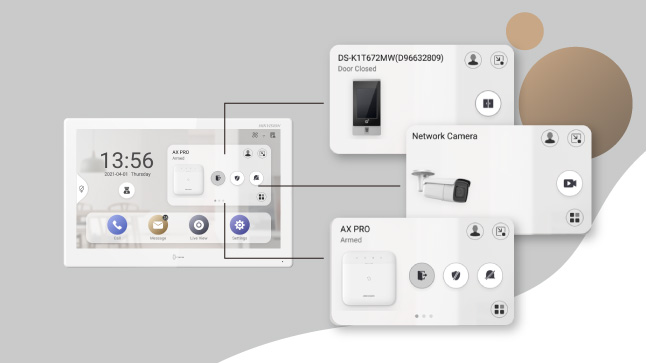
Hikvision All-in-one Indoor Station takes a whole new approach to security. Along with video intercom, it also serves as a home or office management center featuring visualized interfaces. With the built-in Hik-Connect App, users will enjoy the simple control and flexible linkage among various Hikvision devices. And it’s all managed with a simple tap on the touchscreen! What’s more, it features easy integration with third-party Android applications, adding new levels of convenience for users.

How it works

All-in-one management

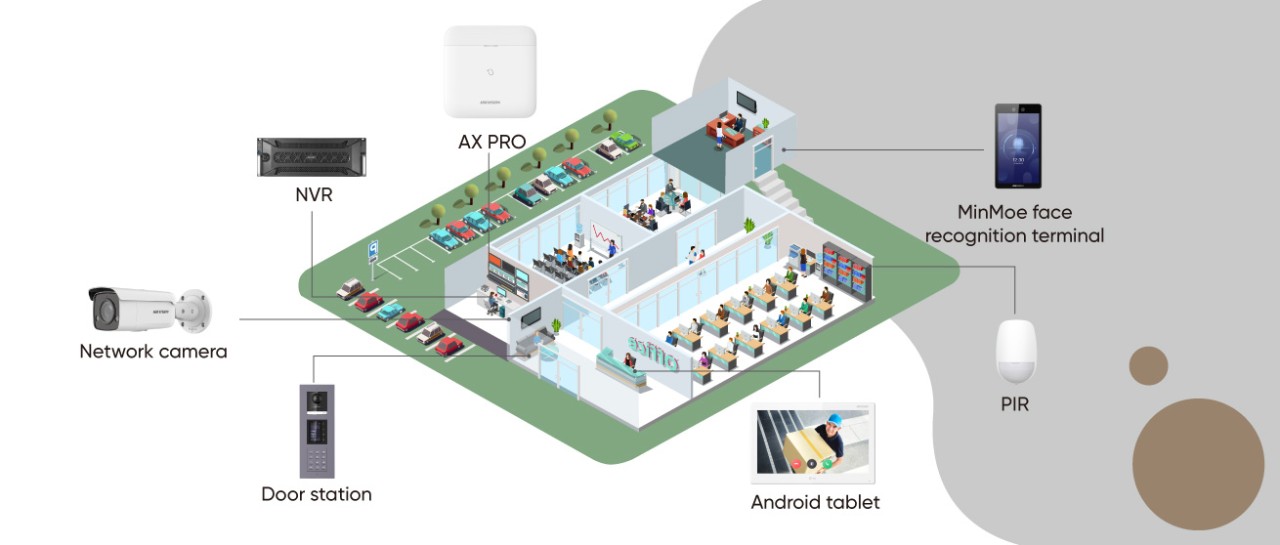
With Hik-Connect built into the indoor station, all Hikvision devices – IP cameras, NVRs, intrusion alarm, video intercom, and more – along with systems including access control, intercom, and video monitoring, can be managed and monitored easily. What’s more, users can easily check device and network status, battery, and environmental temperature, with everything on one screen.
Convenient operation

The indoor station is usually fixed in place at an entrance gate or other convenient location, putting the system within easy reach – even when you don’t have your smartphone with you. Users can complete daily operations conveniently with just a tap when entering or exiting, including:

  • Camera live view and playback
  • Locking/unlocking doors remotely
  • Arming/disarming the alarm system
  • Checking monitoring status
  • Receiving intercom calls

Easy integration with Android applications

With the embedded Android system, the indoor station features easy integration with third-party applications. Beyond Hik-Connect, users can choose to install up to two more Android Apps on the indoor station, and enjoy convenient operation with visualized interfaces.

Product showcase

DS-KH9310-WTE1/ DS-KH9510-WTE1

Selectable product specifications

  • DS-KH9310: 7-inch TFT touch screen, 1024 x 600
  • DS-KH9510: 10-inch IPS touch screen, 1024 x 600

Android system

  • Supports Android app installation
  • Open platform for third-party software integration

Built-in Hik-Connect app

For all-in-one management of Hikvision’s devices including

  • Video intercom devices
  • Intrusion alarm devices
  • Video security devices
  • Access control devices

Application scenarios

Product spotlight

DS-KH9510-WTE1

All-in-one Indoor Station

  • 10.1-inch colorful touch screen with resolution 1024 × 600
  • Supports Android app installation
  • Open platform for the third-party software integration
  • Video intercom & live view on mobile phone all-day
  • Built-in Hik-Connect for all-in-one management
  • Wireless intrusion panel for on-site management
  • Receives 7 seconds of video verification from alarm systems

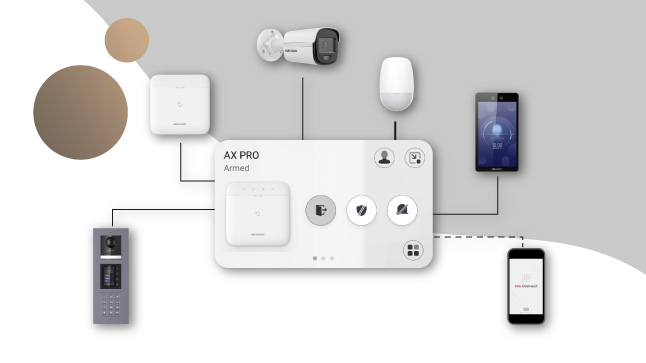
AX PRO SERIES WIRELESS ALARM SYSTEM

At Hikvision, we believe that innovation results in products that can do more while becoming simpler to use. The AX PRO System is the perfect example – it’s an incredible new design that combines the powerful and reliable security systems of the past with the simplicity of tomorrow’s best technology.

AX PRO is both conventional and revolutionary, with proven wireless stability, a wide range of world-class products, and ease-of-use for both installers and end users. Simple setup, powerful protection – whether it’s for a business-owner’s property or a home-owner’s loved ones – bringing peace of mind every day, all day.

Introducing the ax pro system

Key benefits

• Prevent intrusion from the very start

Place around windows, doors, and other areas where intrusions occur for confident security. The AX PRO detectors deliver precise indoor and outdoor detection and all-compassing protection, day and night.

•Detect risks before they break out

The AX PRO system also helps make homes safer for families. It provides fire and water leakage detection before disaster strikes for superior security at every corner.

•Stay informed with real-time video clips

Powered by Hikvision’s IVaaS technology, home- or business-owners can verify alarms by watching video clips or GIF imaging when they are away from the property, staying confident and informed.

•Intelligent control with a scalable system

Setup intelligent control in homes with a whole range of smart control devices, relays, outlets, and more. What’s more, the AX PRO system is flexible and can be linked with other Hikvision devices, offering even more flexibility.

Running the ax pro system is a breeze

The AX PRO System is designed to be easy to install, to use, and to maintain. The extended lifespan of the components and longer battery life deliver the best experience for both installers and end users.

*Note:
• Please update firmware to the latest version
• For installers, it is recommended to install and maintain devices via Hik-ProConnect

Installation is a snap

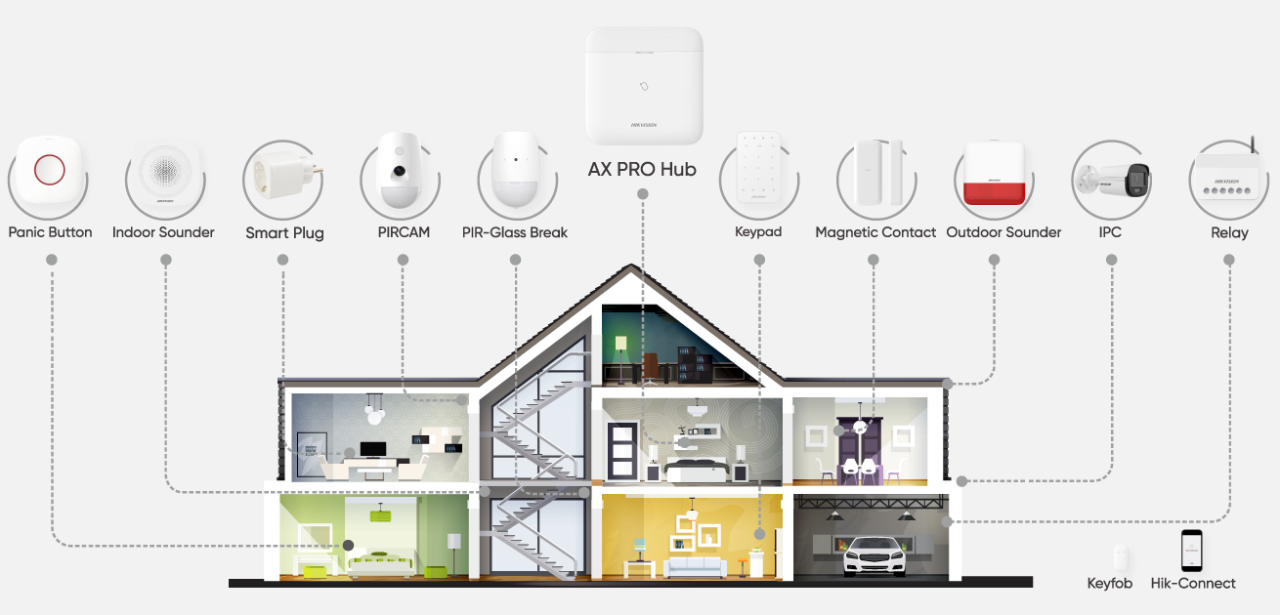
No wires, no worries. The AX PRO system is flexible and installs easily with no wires to limit the setup. Simply install the hub, PIRCAMs, indoor and outdoor detectors, and other peripherals with screws or glue, depending on the mounting surfaces.

Easy operation using the mobile App

With AX PRO, the power is in your hands. You can manage the whole alarm system easily via Hik-Connect and Hik-ProConnect Apps. The convenient, user-friendly interface boosts efficiency, with the option to receive notifications whenever an incident occurs. Fast response from installers and 24/7 cloud service combines to create the most professional experience.

Maintain your alarm system in a simple way

The AX PRO System can be managed and maintained conveniently via the Hik Pro-Connect App or the Web Portal for installers. Installers and monitoring stations can supervise the alarm system status any time from anywhere with the end user’s authorization. What’s more, the health status report is a great tool for installer maintenance service updates.

Industry-leading intrusion alarm technologies

Innovative technologies make up the core of the AX PRO system. With cutting-edge verification, wireless transmission, and detection technologies, Hikvision demonstrates its dedication to providing stable and reliable security for our customers today and tomorrow.

Core technologies

•Video verification

Get instant and efficient verification.

IVaaS (Intrusion Verification as a Service) Technology: supports sending one 7-second event video clip or up to 20 photos via Hik-Connect or by Email for timely verification.

•Wireless transmission

Ensures  fast, reliable and secure wireless transmission.

  • Tri-X & CAM-X Wireless Technology
  • Ultra-long distance transmission, up to 2,000 meters
  • Dual RF-Chip Design
  • Time Division Multiple Access Technology
  • Frequency-Hopping Spread Spectrum Technology
  • Relay Transmission Technology
  • AES-128 Encryption

•Detection technology

Detect with precision fewer false or missing alarms.

  • 3D Optics Technology
  • Pet-immunity technology
  • Independent Floating Thresholds
  • Digital Temperature  Compensation Technology
  • Broadband Sound Detection Technology

******

Your trustworthy choice for wireless alarm systems

The AX PRO system is your trust-worthy choice whether it’s for houses, shops or other small businesses. The whole system is fully compliant with EN grade 2 and products are certified by Telefication. Choose AX PRO, choose peace of mind.

Hikvision Launches New Turbo HD X Security Solutions

Hikvision, the world’s leading supplier of innovative security products and solutions, launches the latest generation Turbo HD Series – Turbo HD X, which is a complete system to help stopping intruders in real-time, and avoiding damage and loss of property.

From passive monitoring to active deterrence, in a wide variety of applications
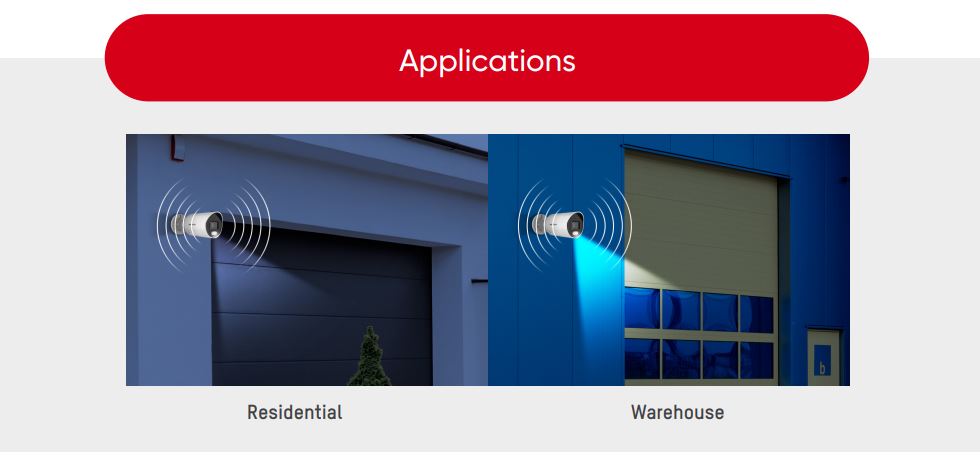
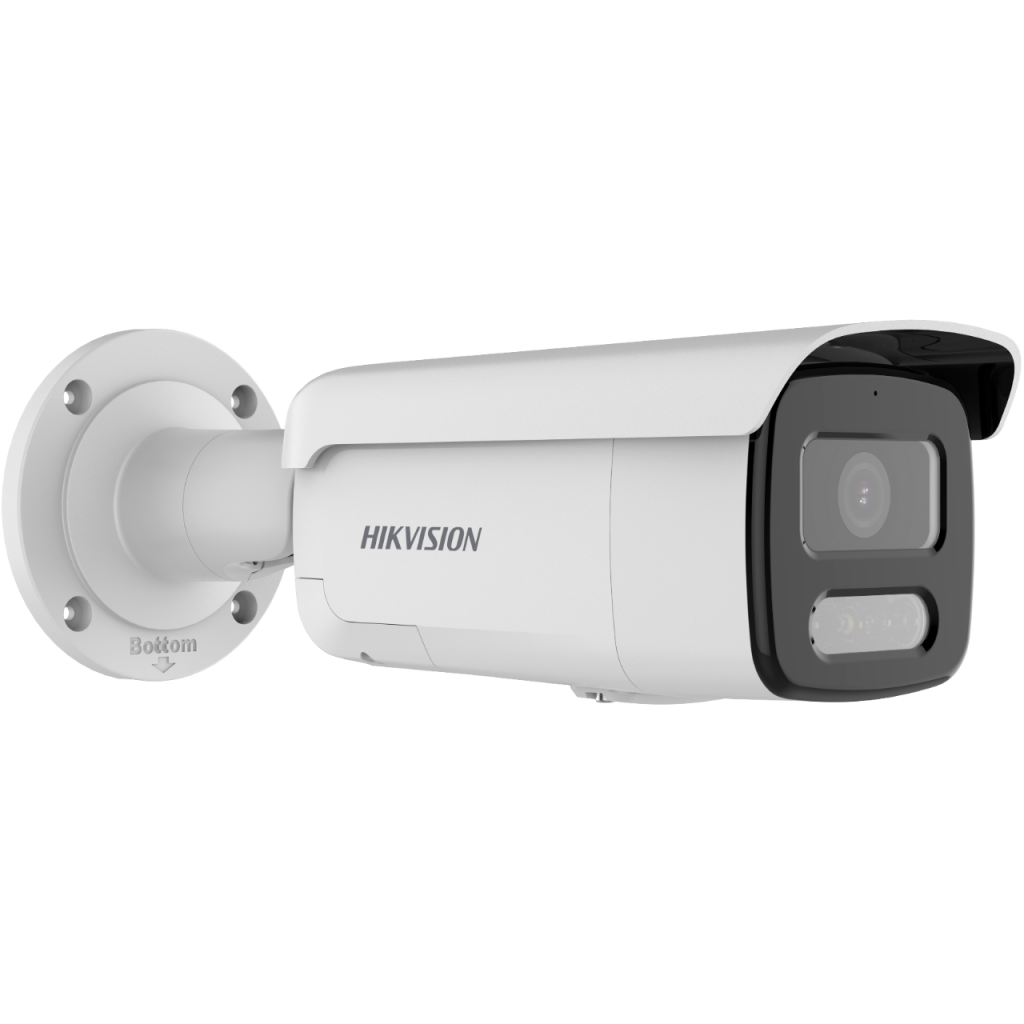
The Hikvision Turbo HD X series of cameras has a built-in detector that captures infrared light emitted by human bodies, distinguishing it from other visual ‘noise’. Once the camera detects a potential intruder, its built-in siren flashes red and blue light and a loud sound with the aim of frightening the intruder away.

The Turbo HD X series can support a broad range of perimeter protection and security system processes for in-process warning, and evidence collection after an event. It enables transformation of the traditional monitoring and post-event investigation approach, and helps to change perimeter protection from passive monitoring to active deterrence in order to protect people and assets. It can be used in warehouses, residences, jewellery stores and more.

A complete end-to-end system
More importantly, the Turbo HD X is a complete and unified system, featuring front-end devices linking to back-end devices and a remote application. As the front-end alarm sends a warning to potential intruders, the system also triggers an alarm at the back-end, to notify security personnel. Users can also receive alarm information remotely, via an application on their mobile devices.

Even better false-alarm reduction
Turbo HD X cameras can also be integrated with Hikvision’s cutting-edge AcuSense DVRs. The intelligent false-alarm reduction technology within these DVRs will disregard irrelevant movements picked up by the camera – such as rain, leaves and animals – and instead focus exclusively on human or vehicle movement. Together, this integrated solution dramatically reduces the number of false alarms, and ensures security staff focus on actual targets for greater efficiency.

Building on already impressive functionality
All of this builds on the impressive functionality that has been delivered by Hikvision’s Turbo HD DVRs and cameras since their launch in 2013. In addition to impressive HD image clarity, the last six years of Turbo HD products have delivered a wealth of innovations to the market, including super-efficient bandwidth and storage usage and ultra-low-light video recording – all helping customers to enhance their security and perimeter protection.

Frank Zhang, the President of the International Product and Solution Center at Hikvision says, “Once again, we are bringing fresh ideas and new possibilities to the industry. Usually, video surveillance records are only searched for evidence after someone has suffered the consequences of an intrusion. However, criminals may give up further actions if they believe their behaviour has been detected. By stopping intruders in their tracks, the Hikvision Turbo HD X can help our customers to avoid costly damage and loss of property.”Continue Shopping

Hikvision announces its webcam debut

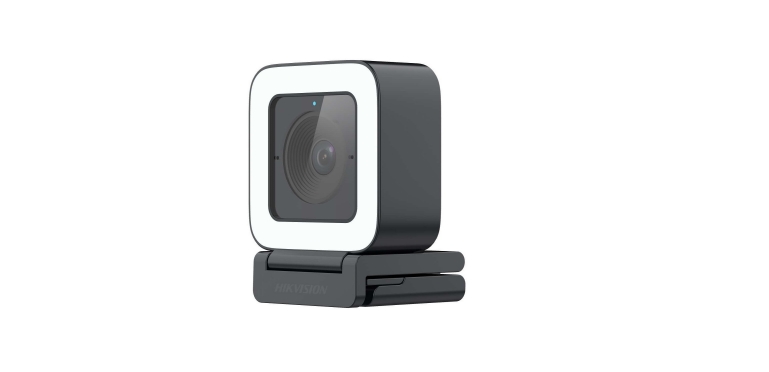
Hikvision, an IoT solution provider with video as its core competence, today announced the launch of its brand-new webcam products to the global market. The product family currently comprises four different series – Ultra, Pro, Live, and Value – designed for various scenarios and user groups, and with bespoke feature sets.
According to industry analyst firms, the global live streaming market is expected to continue growing significantly the coming years. The increase in video streaming among citizens and businesses in all verticals is reported as the main driver for market growth, with content creators diversifying their material and activities, and connecting with audiences in new ways. In addition, complete and partial lockdowns during the COVID-19 crisis also positively impacted the live streaming industry.

To provide immersive video conferencing and streaming experiences, users need webcams that deliver high-resolution imaging and excellent-quality sound in a range of scenarios. Hikvision has designed and developed its new webcam range to meet this need.

Webcams for a range of applications and scenarios

Hikvision Ultra and Pro webcams for remote conferencing
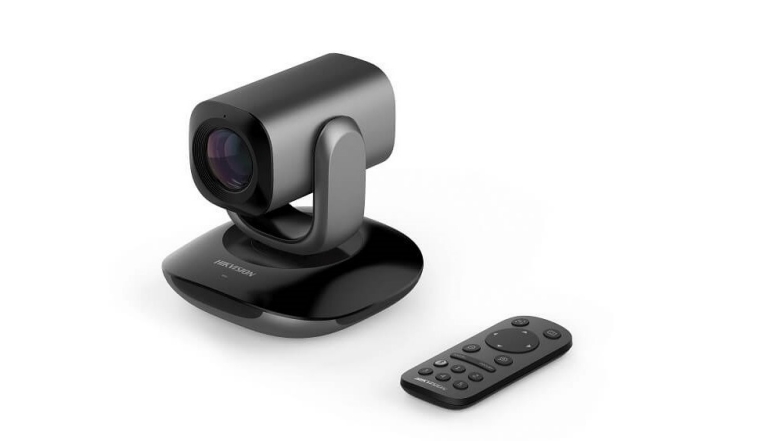
The Hikvision Ultra series of webcams are specifically designed for remote conferencing. The highlight of this series is its PTZ control capability, which offers 5x optical zoom capabilities. This means that users can see meeting presentations or discussions without straining their eyes. Additionally, PTZ control allows users to pan across 330°, helping them adjust their viewing angle easily, without missing a thing.

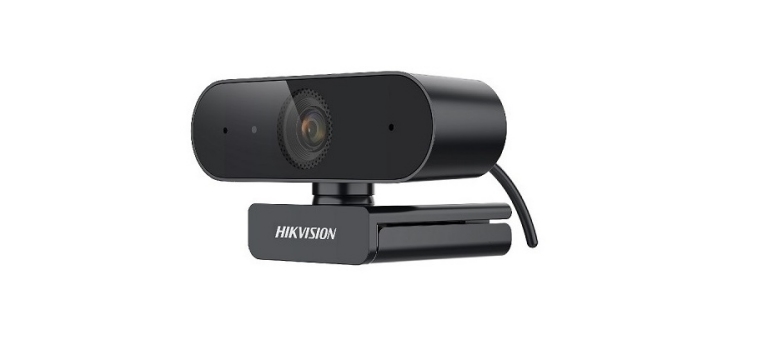
Hikvision’s new webcam range also includes Pro webcams for remote conferencing. These are ideal for business professionals, offering an outstanding, immersive sound and video experience, with a sleek design and an elegant, anodized finish. Pro webcams offer an Auto Focus feature and built-in dual-microphone, ensuring that audio and video is always crystal clear during presentations, conferences, or group discussions.

Hikvision Live webcams for live streaming
The cube-shaped Hikvision Live series of webcams is designed for live streaming, eCommerce, and gaming applications. If a product is being presented in a live program, for example, the webcam view can be changed – both horizontally and vertically – thanks to magnetic mountings on all four sides of the casing.

These webcams also offer Sharp Auto Focus, which ensures that images of people and objects are sharp and clear at all times. Importantly, the webcams’ ‘touchable supplemental LED light’ feature enables users to adjust brightness in accordance with the surrounding environment.

Hikvision Value webcams for online education
The Hikvision Value series is our range of entry level webcams. These have a compact design, making them perfect for online education applications that connect school teachers and students.

The webcam comes with a built-in microphone, which incorporates advanced algorithms to reduce noise and improve sound quality. Its wide-angle lens provides maximum coverage, with no image distortion. This is particularly useful for teachers giving lessons in a classroom, where both the teacher and the blackboard, or wall-mounted screen, can be viewed clearly in a single frame.

Easy and flexible installation

All Hikvision webcams are driver-free, offering ‘plug-and-play’ installation via a standard USB interface. This allows users to begin conferencing or streaming in seconds.

All Hikvision webcams can also be flexibly mounted on users’ equipment, on tables, laptops, monitors, or tripods.

Importantly, Hikvision webcams are equipped with a dedicated PC-based client software, called HIKIN. Users can use this software for video previews, and to configure image and sound parameters. Notably, the webcams can be used with all the leading third-party conferencing platforms with video parameter configured using a simple drop-down menu.

Contact Hikvision for more details

All Hikvision webcams are delivered with a standard 2-year warranty, giving end users reliability and peace of mind.

To find out more about Hikvision webcams, and how they can meet your specific application needs, visit our product page, or contact us today!

Four ways Hikvision offers state-of-the-art false alarm reduction to SMB customers

Do SMB customers want the latest intelligent surveillance features without a full system upgrade? With Hikvision, they can enjoy the benefits of cutting-edge false alarm reduction with an average of 90% accuracy while protecting their existing investment.

False alarm reduction is one of the most intelligent features of modern surveillance systems. Designed to filter out movements from things like rain, leaves and animals, these systems focus on movements by relevant objects like people or vehicles. This prevents time and costs being wasted on non-threatening events.

Saving time and cost is important for Small and Medium-Sized Businesses (SMBs), the question is, how can they access such innovative technology in the most cost-effective way possible?

Tech-savvy surveillance…
Hikvision’s EasyIP 4.0 security solution features intelligent false alarm reduction within its Hikvision AcuSense NVR and IP camera ranges. Currently, a Hikvision AcuSense NVR supports up to four camera channels with false alarm reduction.

Hikvision AcuSense-enabled devices can filter out false alarms with an average of 90% accuracy. What’s more, the Hikvision AcuSense Quick Target Search feature saves time by identifying footage of people and vehicles automatically, avoiding staff having to search through footage manually. Add in Hikvision’s ColorVu IP cameras, which provide full color, vivid images even at night, allows customers to take advantage of false alarm reduction around the clock.

…that’s easily accessible
For SMBs looking to access these features in the most efficient way, Hikvision’s cameras and/or NVRs can be added to their existing surveillance system, to provide reliable false alarm reduction capabilities while protecting their investment.

Below, we describe four different ways Hikvision false alarm reduction can be added to SMB customers’ surveillance systems.

If SMB customers do not want to replace their existing IP cameras, they can keep them, and add a Hikvision AcuSense NVR. This will support false alarm reduction and Quick Target Search across four channels.

It is possible to add extra channels, but these will only have traditional alarm detection features. This solution is best suited for users who only need false alarm reduction in four camera locations.

Conversely, if customers would prefer to keep their existing NVR, Hikvision AcuSense IP cameras can be added to the solution.

It’s worth pointing out that this is most suitable for customers that need false alarms to be filtered out in real time. A conventional NVR will not record or display the false alarms, as the functionality resides in the cameras. Similarly, users cannot search the alarm information delivered by the cameras as the NVR does not support Quick Target Search.

ColorVu cameras deliver bright color video images, even in low light and at night. When paired with a Hikvision AcuSense NVR, SMB customers get a system that delivers highly effective false alarm reduction, plus Quick Target Search capability, around the clock.

The only limitation of this setup is that it is designed to deliver the above features to a maximum of four channels. It is possible to add more channels, but these will only display normal alarm information, and will not support Quick Target Search.

This solution is best suited for customers needing reliable false alarm reduction under low light conditions and across four locations.

When customers need false alarm reduction for more than four camera locations, a cost-effective solution can be delivered by combining conventional IP cameras with Hikvision AcuSense IP cameras and a Hikvision AcuSense NVR.

Because both the Hikvision AcuSense NVR and Hikvision AcuSense IP cameras support false alarm reduction, the functionality starts to overlap when only four Hikvision AcuSense IP cameras connect to a Hikvision AcuSense NVR. It is recommended to apply both products when customers need the function for more than four channels. To be specific, customers can connect up to four conventional IP cameras to a Hikvision AcuSense NVR for false alarm reduction, and then using Hikvision AcuSense IP cameras for the remaining channels. In this way, both false alarm reduction and Quick Target Search will be available across all channels.

Discover more
When comes to analogue surveillance system, it is not a conundrum if customers ask to add false alarm reduction to their existing system. They can easily replace with an Hikvision AcuSense DVR from Hikvision’s Turbo HD 5.0 product range, which makes the very most of legacy cabling. Accordingly, the system will be able to perform false alarm reduction and quick target search across up to four channels. If customers have the requirement for more than four channels, they can either add extra Hikvision AcuSense DVRs or Hikvision AcuSense network cameras.

With Hikvision, SMBs can take advantage of state-of-the-art surveillance systems in a way that suits their business needs and their budget. Equally important, the abovementioned different solution options can help system integrators and installers engage in new conversations with their customers.

 Continue Shopping

Hikvision Network Camera Firmware Version: V5.6.6 Release Note (2021-07-13)

2xx3G0, 2xx3G1, 2xx5F(H)WD, 2xx5G0, 2xx5G1, 2xx7G1, Camera V5.6.6

New Release:
G1 platform Network camera V5.6.6 build210625

1. Fixed the issue that the main stream of the 2645FWD, 2745FWD and 2H45FWD does not support 1280*720 resolution.
2. Fixed the issue that the wired and wireless IP addresses are set differently on Wi-Fi models. After unplugging the network cable, both IPs can access the device.
3. Fixed the issue that the algorithm does not detect targets after Du-VCA function is enabled and running for a period of time.
4. Fixed the issue that the SVC function of the camera is invalid after connecting to the NVR and enable SVC on the NVR side.
5. Fixed the issue of low volume pickup on some models.
6. Fixed the issue that Hik-Connect cannot be online after registration due to rules changes regarding the virtual model of oversea products.

Supported Product List (2xx3G0, 2xx3G1, 2xx5F(H)WD, 2xx5G0, 2xx5G1, 2xx7G1 Series)
Product Category
Model Number
EasyIP 2.0 Plus Series
DS-2CD2023G0-I
EasyIP 2.0 Plus Series
DS-2CD2043G0-I
EasyIP 2.0 Plus Series
DS-2CD2063G0-I
EasyIP 2.0 Plus Series
DS-2CD2083G0-I
EasyIP 2.0 Plus Series
DS-2CD2123G0-I(S)
EasyIP 2.0 Plus Series
DS-2CD2123G0-IU
EasyIP 2.0 Plus Series
DS-2CD2143G0-I(S)
EasyIP 2.0 Plus Series
DS-2CD2143G0-IU
EasyIP 2.0 Plus Series
DS-2CD2163G0-I(S)
EasyIP 2.0 Plus Series
DS-2CD2163G0-IU
EasyIP 2.0 Plus Series
DS-2CD2183G0-I(S)
EasyIP 2.0 Plus Series
DS-2CD2183G0-IU
EasyIP 2.0 Plus Series
DS-2CD2323G0-I(U)
Hikvision Digital Technology CO., Ltd.
No. 555 Qianmo Road, Binjiang District, Hangzhou 310051, China
Tel: +86-571-8807-5998
EasyIP 2.0 Plus Series
DS-2CD2343G0-I(U)
EasyIP 2.0 Plus Series
DS-2CD2363G0-I(U)
EasyIP 2.0 Plus Series
DS-2CD2383G0-I(U)
EasyIP 2.0 Plus Series
DS-2CD2423G0-IW(W)
EasyIP 2.0 Plus Series
DS-2CD2443G0-IW(W)
EasyIP 2.0 Plus Series
DS-2CD2463G0-IW(W)
EasyIP 2.0 Plus Series
DS-2CD2483G0-I(W)
EasyIP 2.0 Plus Series
DS-2CD2523G0-I(W)(S)(D)
EasyIP 2.0 Plus Series
DS-2CD2543G0-I(W)(S)(D)
EasyIP 2.0 Plus Series
DS-2CD2563G0-I(W)(S)(D)
EasyIP 2.0 Plus Series
DS-2CD2623G0-IZS
EasyIP 2.0 Plus Series
DS-2CD2623G1-IZ(S)
EasyIP 2.0 Plus Series
DS-2CD2643G0-IZS
EasyIP 2.0 Plus Series
DS-2CD2643G1-IZ(S)
EasyIP 2.0 Plus Series
DS-2CD2663G0-IZS
EasyIP 2.0 Plus Series
DS-2CD2663G0-IZS(B)
EasyIP 2.0 Plus Series
DS-2CD2663G1-IZ(S)
EasyIP 2.0 Plus Series
DS-2CD2683G0-IZS
EasyIP 2.0 Plus Series
DS-2CD2683G1-IZ(S)
EasyIP 2.0 Plus Series
DS-2CD2723G0-IZS
EasyIP 2.0 Plus Series
DS-2CD2723G1-IZ(S)
EasyIP 2.0 Plus Series
DS-2CD2743G0-IZS
EasyIP 2.0 Plus Series
DS-2CD2743G1-IZ(S)
EasyIP 2.0 Plus Series
DS-2CD2763G0-IZS
EasyIP 2.0 Plus Series
DS-2CD2763G0-IZS(B)
EasyIP 2.0 Plus Series
DS-2CD2763G1-IZ(S)
EasyIP 2.0 Plus Series
DS-2CD2783G0-IZS
EasyIP 2.0 Plus Series
DS-2CD2783G1-IZ(S)
EasyIP 2.0 Plus Series
DS-2CD2H23G0-IZS
EasyIP 2.0 Plus Series
DS-2CD2H23G1-IZ(S)
EasyIP 2.0 Plus Series
DS-2CD2H43G0-IZS
EasyIP 2.0 Plus Series
DS-2CD2H43G1-IZ(S)
EasyIP 2.0 Plus Series
DS-2CD2H63G0-IZS
EasyIP 2.0 Plus Series
DS-2CD2H63G0-IZS(B)
EasyIP 2.0 Plus Series
DS-2CD2H63G1-IZ(S)
EasyIP 2.0 Plus Series
DS-2CD2H83G0-IZS
EasyIP 2.0 Plus Series
DS-2CD2H83G1-IZ(S)
EasyIP 2.0 Plus Series
DS-2CD2T23G0-I5/8
EasyIP 2.0 Plus Series
DS-2CD2T43G0-I5/8
EasyIP 2.0 Plus Series
DS-2CD2T63G0-I5/8
EasyIP 2.0 Plus Series
DS-2CD2T83G0-I5/8
EasyIP 3.0 Series
DS-2CD2025FWD-I
EasyIP 3.0 Series
DS-2CD2025FHWD-I
EasyIP 3.0 Series
DS-2CD2035FWD-I
EasyIP 3.0 Series
DS-2CD2045FWD-I
EasyIP 3.0 Series
DS-2CD2055FWD-I
EasyIP 3.0 Series
DS-2CD2065G1-I
EasyIP 3.0 Series
DS-2CD2085FWD-I
EasyIP 3.0 Series
DS-2CD2085G1-I
EasyIP 3.0 Series
DS-2CD2125FWD-I(S)
EasyIP 3.0 Series
DS-2CD2125FWD-IM
EasyIP 3.0 Series
DS-2CD2125FHWD-I(S)
EasyIP 3.0 Series
DS-2CD2125G0-IMS
EasyIP 3.0 Series
DS-2CD2135FWD-I(S)
EasyIP 3.0 Series
DS-2CD2145FWD-I(S)
EasyIP 3.0 Series
DS-2CD2155FWD-I(S)
EasyIP 3.0 Series
DS-2CD2165G0-I(S)
EasyIP 3.0 Series
DS-2CD2185FWD-I(S)
EasyIP 3.0 Series
DS-2CD2185G0-IMS
EasyIP 3.0 Series
DS-2CD2325FWD-I
EasyIP 3.0 Series
DS-2CD2325FHWD-I
EasyIP 3.0 Series
DS-2CD2335FWD-I
EasyIP 3.0 Series
DS-2CD2345FWD-I
EasyIP 3.0 Series
DS-2CD2345G0P-I
EasyIP 3.0 Series
DS-2CD2355FWD-I
EasyIP 3.0 Series
DS-2CD2365G1-I
EasyIP 3.0 Series
DS-2CD2385FWD-I
EasyIP 3.0 Series
DS-2CD2385G1-I
EasyIP 3.0 Series
DS-2CD2425FWD-I(W)
EasyIP 3.0 Series
DS-2CD2425FWD-IW(W)
EasyIP 3.0 Series
DS-2CD2435FWD-I(W)
EasyIP 3.0 Series
DS-2CD2455FWD-I(W)
EasyIP 3.0 Series
DS-2CD2455FWD-IW(W)
EasyIP 3.0 Series
DS-2CD2525FWD-I(W)(S)(D)
EasyIP 3.0 Series
DS-2CD2525FHWD-I(W)(S)
EasyIP 3.0 Series
DS-2CD2535FWD-I(W)(S)
EasyIP 3.0 Series
DS-2CD2545FWD-I(W)(S)
EasyIP 3.0 Series
DS-2CD2545FWD-I(W)(S)(B)
EasyIP 3.0 Series
DS-2CD2545FWD-I(W)(S)(D)
EasyIP 3.0 Series
DS-2CD2555FWD-I(W)(S)
EasyIP 3.0 Series
DS-2CD2555FWD-I(W)(S)(D)
EasyIP 3.0 Series
DS-2CD2625FWD-IZS
EasyIP 3.0 Series
DS-2CD2625FHWD-IZS
EasyIP 3.0 Series
DS-2CD2625G1-IZ(S)
EasyIP 3.0 Series
DS-2CD2635FWD-IZS
EasyIP 3.0 Series
DS-2CD2645FWD-IZS
EasyIP 3.0 Series
DS-2CD2645FWD-IZS(B)
EasyIP 3.0 Series
DS-2CD2645FWD-IZS(C)
EasyIP 3.0 Series
DS-2CD2645G1-IZ(S)(B)
EasyIP 3.0 Series
DS-2CD2645G1-IZ(S)(C)
EasyIP 3.0 Series
DS-2CD2655FWD-IZS
EasyIP 3.0 Series
DS-2CD2655FWD-IZS(B)
EasyIP 3.0 Series
DS-2CD2665G0-IZS
EasyIP 3.0 Series
DS-2CD2665G1-IZ(S)
EasyIP 3.0 Series
DS-2CD2685FWD-IZS
EasyIP 3.0 Series
DS-2CD2685G0-IZS
EasyIP 3.0 Series
DS-2CD2685G1-IZ(S)
EasyIP 3.0 Series
DS-2CD2725FWD-IZS
EasyIP 3.0 Series
DS-2CD2725FHWD-IZS
EasyIP 3.0 Series
DS-2CD2725G1-IZ(S)
EasyIP 3.0 Series
DS-2CD2735FWD-IZS
EasyIP 3.0 Series
DS-2CD2745FWD-IZS
EasyIP 3.0 Series
DS-2CD2745FWD-IZS(B)
EasyIP 3.0 Series
DS-2CD2745FWD-IZS(C)
EasyIP 3.0 Series
DS-2CD2745G1-IZ(S)(B)
EasyIP 3.0 Series
DS-2CD2745G1-IZ(S)(C)
EasyIP 3.0 Series
DS-2CD2755FWD-IZS
EasyIP 3.0 Series
DS-2CD2755FWD-IZS(B)
EasyIP 3.0 Series
DS-2CD2765G0-IZS
EasyIP 3.0 Series
DS-2CD2765G1-IZ(S)
EasyIP 3.0 Series
DS-2CD2785FWD-IZS
EasyIP 3.0 Series
DS-2CD2785G0-IZS
EasyIP 3.0 Series
DS-2CD2785G1-IZ(S)
EasyIP 3.0 Series
DS-2CD2H25FWD-IZS
EasyIP 3.0 Series
DS-2CD2H25FHWD-IZS
EasyIP 3.0 Series
DS-2CD2H25G1-IZ(S)
EasyIP 3.0 Series
DS-2CD2H35FWD-IZS
EasyIP 3.0 Series
DS-2CD2H45FWD-IZS
EasyIP 3.0 Series
DS-2CD2H45FWD-IZS(B)
EasyIP 3.0 Series
DS-2CD2H45FWD-IZS(C)
EasyIP 3.0 Series
DS-2CD2H45G1-IZ(S)
EasyIP 3.0 Series
DS-2CD2H45G1-IZ(S)(B)
EasyIP 3.0 Series
DS-2CD2H45G1-IZ(S)(C)
EasyIP 3.0 Series
DS-2CD2H55FWD-IZS
EasyIP 3.0 Series
DS-2CD2H55FWD-IZS(B)
EasyIP 3.0 Series
DS-2CD2H65G1-IZ(S)
EasyIP 3.0 Series
DS-2CD2H85FWD-IZS
EasyIP 3.0 Series
DS-2CD2H85G1-IZ(S)
EasyIP 3.0 Series
DS-2CD2T25FWD-I5/I8
EasyIP 3.0 Series
DS-2CD2T25FHWD-I5/I8
EasyIP 3.0 Series
DS-2CD2T35FWD-I5/I8
EasyIP 3.0 Series
DS-2CD2T45FWD-I5/I8
EasyIP 3.0 Series
DS-2CD2T45G0P-I
EasyIP 3.0 Series
DS-2CD2T55FWD-I5/I8
EasyIP 3.0 Series
DS-2CD2T65G1-I5/I8
EasyIP 3.0 Series
DS-2CD2T85FWD-I5/I8
EasyIP 3.0 Series
DS-2CD2T85G1-I5/I8
Pro 2 Series with ColorVu
DS-2CD2327G1-L(U)
Pro 2 Series with ColorVu
DS-2CD2347G1-L(U)
Pro 2 Series with ColorVu
DS-2CD2T27G1-L
Pro 2 Series with ColorVu
DS-2CD2T47G1-L

Customer Impact and Recommended Action

This update refers to function/compatibility improvement and will take effect automatically after the Date of Change. We are very sorry for any inconvenience of use-habit changes caused by this action.
For any questions and request for this firmware, please contact our local technical support team.

• Hikvision reserves the right to change, alter or withdraw the above notification without prior notice.
• Product design and specifications are subject to change without prior notice.
• The Hikvision firmware may contain errors known as errata which may cause the product to deviate from published specifications. Current characterized errata are available on request.
• Hikvision is not liable for any typing or printing errors.

Features

1. Improved Features
• Fixed the issue that the main stream of the 2645FWD, 2745FWD and 2H45FWD model does not support 1280*720 resolution.
• Fixed the issue that the wired and wireless IP addresses are set differently on Wi-Fi models. After unplugging the network cable, both IPs can access the device.
• Fixed the issue that the algorithm does not detect the target after the device enable the Du-VCA function and runs for a period of time.
• Fixed the issue that the SVC function of the camera is invalid after connecting to the NVR and enable SVC on the NVR side.
• Fixed the issue of low volume pickup on some models.

Hikvision Releases Product Security White Paper and an Updated Cybersecurity White Paper

Hangzhou, China – June 4, 2019 – Hikvision, the world’s leading provider of security products and solutions, released the first version of its Product Security White Paper, introducing the security challenges of IoT products and sharing Hikvision’s practices to continuously improve the security throughout the whole product lifecycle.

The Product Security white paper outlines Hikvision’s comprehensive approach to product security covering device security, data security, application security, network security, privacy protection, and security compliance, which can greatly enhance the product security and the risk resistance in various application scenarios.

“Interconnection of IoT devices is becoming much more common today, while the consequent risks are fast growing. Product security remains among our top priorities on multiple dimensions such as R&D, production, and delivery. We also hope to raise the awareness of security issues and establish trust and cooperation with all the stakeholders by sharing our insights”, said Dr. Wang Bin, Vice President, Director of Network and Information Security Laboratory of Hikvision.

In addition to the newly released Product Security White Paper, Hikvision also released an updated Cybersecurity White Paper, which comprehensively illustrates the current security threats for IoT and relevant challenges for the whole security industry, and it shares Hikvision’s ongoing efforts to improve its cybersecurity system.

According to the updated Cybersecurity White Paper, the existing security research and development process of Hikvision has been enhanced with more advanced technical means and tools, which meets higher standards in terms of design, development, verification, risk mitigation, and configuration management. Meanwhile, the company has optimized the operation mechanism and the professional qualifications of its security teams.

The white paper also highlights the security issues related to supply chain management. The company has adopted effective technical and management systems to ensure supply chain security with reference to the international standards, extending the protection scope of cybersecurity systems and building a security ecosystem together with supply chain partners.Continue Shopping

Pro Series with Live Guard & ColorVu Technology

Live-Guard

Strobe Light Alarm & Audio Alarm to warn off intruders

  • White strobe light alarm
  • Audio broadcasts: 10 built-in // 3 customisable
  • Two-way audio
  • Hik-Connect: One-key ‘Do Not Disturb’ function
    and Two-Way Audio

AcuSense Technology

AcuSense technology can capture human or vehicle targets with vivid details, providing increased security no matter the time of day or night.

Product Showcase

DS-2CD2T47G2-LSUSL

LEARN MORE

————————————————————————————————————————————-

DS-2CD2047G2-LU/SL

LEARN MORE

————————————————————————————————————————————-

DS-2CD2347G2-LSU/SL

 LEARN MORE

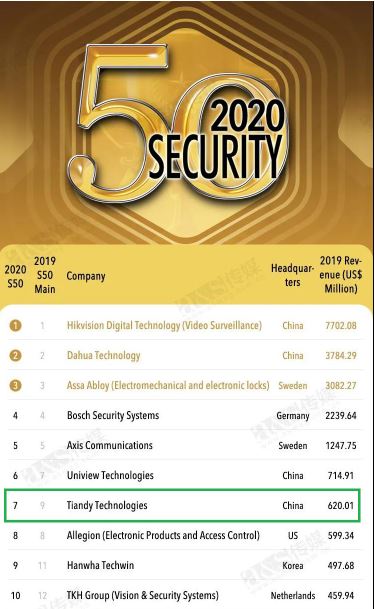
Tiandy won 7th in the a&s “2020 Global Security 50 Ranking”

Congratulations!

Tiandy Technologies Co., Ltd. has gone upward in the a&s “2020 Global Security 50 Ranking”

Now 7th of the world’s Top 10 security brands.

We are very excited to announce that Tiandy has risen to 7th in the a&s Top Security 50 newly released today and again held top 10 security brand. The a&s conducts an analysis on influential surveillance companies worldwide and makes a ranking according to their 2019 sales revenue.

With the continuously increasing demand of global security and the rapid improvement in software and hardware, Chinese brands are recognized by more and more users from different countries. Since the year of 2008, Tiandy has established an international department to officially explore overseas market and for years, has built up a completely mature international marketing system. Exported to more than 60 countries and regions around the world, the products are widely used in Beijing Tiananmen, China Launch Center of Carrier Rockets, Davos Forum, Petra Ancient City, London Heathrow Airport, and more than 400 smart cities such as the capital of Ecuador and Tajikistan. And especially super starlight cameras, panoramic PTZ and other products are highly thought of by overseas customers.

In 2020, Tiandy keeps up with the pace of the times and makes in-depth explorations in AI, cloud computing, big data, etc., and becomes a pioneer in the industrialization of artificial intelligence in China. Facing the future, Tiandy will continue to take “Vision for World” as our corporate mission, relying on global market demand, further consolidate corporate scientific research capabilities, launch products with more national security competitiveness, and open up more possibilities for the industry. The industry’s affirmation and the deepening of the market are inseparable from the support of customers and partners, the recognition of users, and the hard work of all Tiandy’s staff. Tiandy will stick to its original aspiration and fulfill its mission, representing the “Intelligent Manufacturing in China” of the security industry.

New DY5 Positioning System – Pre-Order Now !!!

DarkFighter AcuSense Positioning System

DS -2DY5225IX2DY5225IX-AE(T5)

  • Darkfighter technology
  • AcuSense technology
  • 2mp, 25X
  • Alarm: 7/2
  • Audio: 1/1
  • 250m IR
  • Power: 24V AC& Hi -PoE
  • Auto Tracking 2.0

Pre-order Now

SpecDS-2DY5223IW-AE(base line)DS-2DY5225IX-AE(T5)
Size
Video CompressionH.264H.265/H.264
IR distance150m250m
Optical zoom23X25X
BNC OutputyesNA
Sensor1/1.9’’ Progressive Scan CMOS1/1.8’’ Progressive Scan CMOS
StreamMain&SubMain&Sub&Third
SD Card slotInternal slotExternal slot
PT SpeedPan: 0.1°-200°/s, Tilt: 0.1°-50°/sPan: 0.1°-150°/s, Tilt: 0.1°-80°/s
Smart TrackingNoSmart Tracking 2.0
False alarm reductionnoyes
Face captureNoYes(mutual exclusive with false alarm reduction)

DS-2DY5225IX-DM(T5)

  • Darkfighter technology
  • AcuSense technology
  • 2mp, 25X
  • Alarm: NA
  • 250m IR
  • Power: 12VDC& PoE
  • Auto Tracking 2.0

Pre-Order Now

SpecDS-2DY5223IW-DM(base line)DS-2DY5225IX-DM(T5)
Size
CableFly lead from sidecable from side
Video CompressionH.264H.265/H.264
IR distance150m250m
Optical zoom23X25X
Alarm I/O2/1NA
Sensor1/1.9’’ Progressive Scan CMOS1/1.8’’ Progressive Scan CMOS
StreamMain&SubMain&Sub&Third
SD Card slotInternal slotExternal slot
Smart TrackingNoSmart Tracking 2.0
False alarm reductionnoyes
Face captureNoYes (mutual exclusive with false alarm reduction)
Power12V DC12V DC& PoE