March 25, 2020 – Hikvision, the world’s leading provider of innovative security products and solutions, announced its new access control and time attendance offerings, the MinMoe Face Recognition Terminals, promising a new era of face recognition access control is coming.
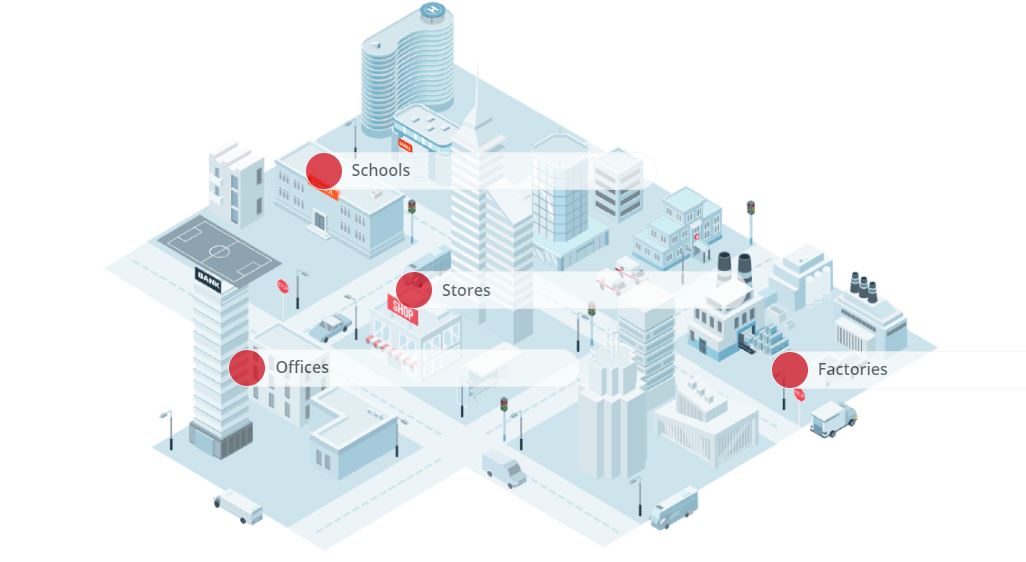
To meet a multitude of real-world scenarios and customer needs, the MinMoe Face Recognition Terminals lineup features four total series: Value Series, Pro Series, Ultra Series, and Face Recognition Modules for Turnstile. With powerful functions and competitive prices, the Value Series (DS-K1T341A/DS-K1T331) products have been uniquely designed for SMB scenarios, such as offices and retail shops.
“We see great advantages in the ‘touch-free’ experience that face recognition provides. With advanced deep learning technology and diverse practical functions, we expect that MinMoe Face Recognition Terminals can bring more security and efficiency to our small and medium sized customers, making access control and time attendance much easier,” says Frank Zhang, President of the International Product and Solution Center at Hikvision.
Fast, accurate recognition, even in darkness
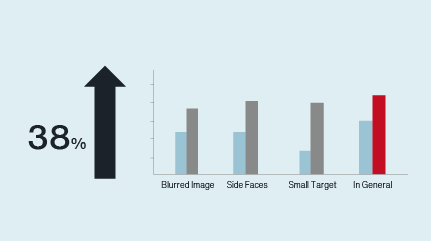
Hikvision MinMoe Face Recognition Terminals are powered by a deep learning algorithm, which increases accuracy of face recognition to over 99% and enhances verification speeds to under 0.2 seconds. The enhanced verification rates and accuracy ensure a pleasant, “touch-free” experience for users – a vast improvement over swiping ID cards or fingerprint scans.
Furthermore, MinMoe Face Recognition Terminals perform well in low- and even zero-light environments.
Better security with face anti-spoofing
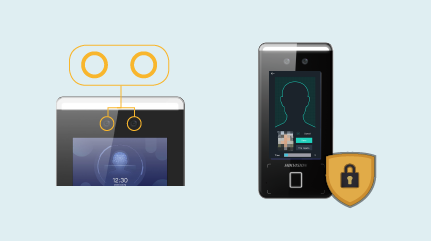
Equipped with dual lenses – a visible light lens and an infrared lens – MinMoe Face Recognition Terminals will only grant access when both lenses detect the same person, as well as determine whether the face is actual, not an image. This anti-spoofing technology makes access control management much safer and prevents most attendance fraud.
Multiple linkages and third-party integration options
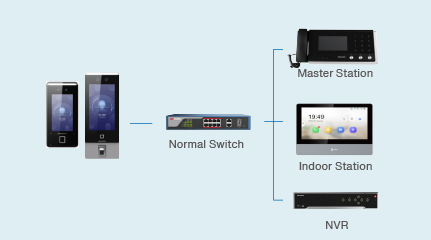
Along with door linkage, MinMoe Face Recognition Terminals can be linked with NVRs for data recording and storage. They can also be linked with network cameras to allow clear video recording of the scene when any pre-set events are triggered. Meanwhile, MinMoe products provide an abundance of third-party integration options for extensive compatibility, allowing quick and cost-effective connections between MinMoe Face Recognition Terminals and customers’ existing door control and attendance systems.
For more information about Hikvision MinMoe Face Recognition Terminals, visit here.
Microsoft has stopped further support on IE browser in Windows 11. That causes a problem that IE browser service will not be available on Hikvision products. To solve the issue, Hikvision will use other browsers to continue the same service to replace IE browser. There are three solutions to use the service: non-plug-in service, local service and use IE compatibility mode on Edge browser. Furthermore, service on IE browser is also supported. Customers can remain to use the same service on IE browser if they do not upgrade their computer devices to Windows 11.
Introduction to solutions
Non-plug-in service
a) Service contents No plug-in installation is required, customers can use the service by logging directly. The service supports more functions on video and requires less storage on device; programme of the service embedded into the device; but supports less features on HD and splicing products. The non-plug-in service suits scenarios which require additional video functionalities rather than HD live view and playback, but where storage space is limited.
b) How to install No action required.
Local service
a) Service contents Plug-in installation is required. This option offers more supported functions as well as the use of their IE browser. Local service supports the most functions compared with other service, including HD live view and, full video functionality. However, it requires a large amount of storage space, and needs to be downloaded and installed onto computer devices. Local service is a good fit for customers who need both maximum video functionalities and HD live/playback, and who have enough storage space for the plug-in.
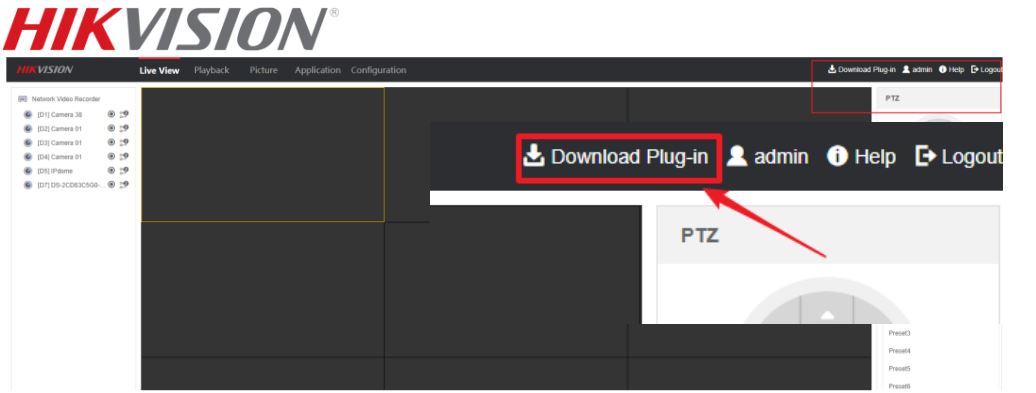
b) How to install Step1. Ensure Computer devices need to connect internet. Step2. Log into a web browser Step3. Download and install plug-in
Comparison: Non-plug-in service, Local service and Service on IE
Non-plug-in service supports the fewest functions compared with the other two services. It is suitable for scenarios where HD live view and playback functionality is not essential, and there is limited storage space. Local service, meanwhile, offers the same as the service on IE. There is a chart for comparison among the three services.
IE compatibility mode on Edge browser
a) Service contents This solution is not recommended, as operations are necessarily more complicated than with the other solutions. But for customers who are willing to use the Edge browser as if it was IE, they can use the IE compatibility mode on Edge browser.
b) How to install Please refer to this guidance. https://hiknow.hikvision.com.cn/kms/kms/multidoc/kms_multidoc_knowledge/kmsMultidocKnowledge.do?meth od=view&fdId=17f0c0ef9d35ef59018e0fd47aea2cb2
c) Which devices are supported? All devices are supported. Computer devices should be using Windows 11, with Edge version 89+.
Disclaimer The documents “Alternative Strategies for Internet Explorer Web Services” and “How to enable IE compatibility mode on Microsoft Edge” are provided for informational purposes only. HIKVSION is not responsible for any errors or omissions, or for the results of using this information. All information included in these two documents is provided “as is”, with no guarantee of completeness, accuracy, timeliness or of the results obtained from the use of this information. In no event will HIKVISION, its directors, officers, employees, or agents be liable to you for any special, consequential, incidental, or indirect damages, including, among others, damages for loss of business profits, business interruption, or loss of data or documentation, in connection with the use of these two documents
March 28, 2022 – Hikvision, an IoT solution provider with video as its core competency, has announced the integration of its Digital Signage Pro Series with SaturnVision, a content management system from Saturn Visual Solutions, a digital signage consultancy in the UK.
The integration enables commercial display operators to use SaturnVision software to configure and manage Hikvision’s digital display screens with ease, and provide customized screen layout, efficient content scheduling including display of dynamic content and apps from social media feeds, live TV, and web pages. The new, enterprise-grade and cloud-based content management solution facilitates improved operational efficiencies and helps users better achieve the goals of their communications, in industries such as retail, healthcare, education, entertainment, and transportation.
“As a digital signage consultancy, we keep a close eye on the products available on the market. We have been impressed by the quality of Hikvision’s Pro Series and expect what can be achieved by combining our team’s creativity, and SaturnVision content management software with Hikvision’s products,” said Matthew Drury, Sales and Marketing Director at Saturn Visual Solutions.
“The integration provides a seamless operation of Hikvision digital signage products with Saturn Visual’s software,” said Adler Wu, Global Technology Partner Alliance Manager at Hikvision. “We expect to see such an intelligent toolbox bring more benefits to our customers.”
Find Out More
For more details about the integration of Hikvision’s Digital Signage Pro Series with SaturnVision, please visit this link.
About Saturn Visual Solutions
Saturn Visual Solutions is a digital signage consultancy that provides a comprehensive suite of specialist digital signage agency solutions and services, which range from solution design and installation, to content creation and technical support.
Hikvision offers an intelligent, high performance, Radar PTZ Camera to meet the most challenging locations which demand high performance perimeter protection.
In a recent press release, John Xiao, Hikvision Vice President of Marketing stated: “There is a growing demand for increased surveillance visibility in remote and widespread areas in all types of challenging conditions, weather and lighting. Hikvision has engineered an intelligent Radar PTZ Camera to accommodate such demanding perimeter surveillance applications.”
The camera features high performance at a great value, designed to operate effectively 24/7 in virtually any weather or lighting condition with the ability to detect intrusion and line-crossing events. It is the ideal solution for a wide range of applications at airports, railways, museums, oil and gas fields, warehouses and manufacturing facilities, and other locations.
The camera combines security radar with a network speed dome. The radar adopts phased array technology for intrusion detection, which is able to detect the distance, speed, and location of targets. The camera features 40x optical and 16x digital zoom with smart IR technology with a detection range of up to 660 feet. The camera also supports people density detection in the panoramic channel.
Authorized access has come a long way from using keys, pin codes, cards, and fingerprints. We now find ourselves stepping into the era of face recognition.
The use of face recognition in access control and time attendance has been an inevitable trend, which creates advantageous “touch-free” experience. With advanced deep learning technology and practical functions, Hikvision MinMoe Face Recognition Terminals bring better security and improved efficiency to access control and time attendance tracking, making them easier than ever!
PRODUCT HIGHLIGHTS
Superior Recognition in Any Environment
Accuracy Rate over 99%
Recognition Speed under 0.2 Seconds
Fast Recognition in Low-light Environments, Even in Complete Darkness
Top Level Security
Face Anti-Spoofing Ensures Access Security
Data Encryption to Protect Data Privacy
Easy to Manage and Operate
Quick and Easy Registration with Various Access Methods
Remote Control via Mobile App
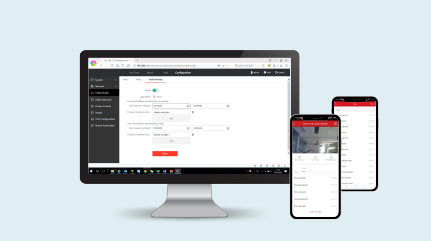
Convenient Web Configurations
Better Extensibility
Linkage with NVRs, Network Cameras, and Indoor Intercom Stations
Hikvision is excited to introduce the new TandemVu ColorVu PTZ cameras. These new cameras provide an innovative solution to the current limitations of conventional security systems. The fresh design integrates PTZ and bullet camera capabilities into a single unit. Several advanced features allow the TandemVu camera to deliver a big picture view as well as a zoomed-in view at the same time.
The TandemVu PTZ camera ensures 100% security coverage with no blind spots and no hang-ups related to the zooming, tilting, or panning motion. Signature Hikvision technology provides crystal-clear, full-color images 24/7. Built-in smart automation enables differentiating between security threats and harmless moving objects like falling leaves, heavy rain, or animals. This camera is ideal for perimeter protection when detecting people and vehicles passing by.
Key features of the TandemVu PTZ cameras include:
Two-in-one design: One camera provides multiple-camera benefits with a one-time installation and one IP to manage
Extraordinary imaging with more vivid, detailed, and super wide views without distortion thanks to two 4-MP lenses
Intelligent functions such as target classification, smart linkage, and audio & strobe light warnings
Budget-friendly cost saving users time and energy
The TandemVu PTZ camera is available in 7-inch and 8-inch models. Learn more about these cameras in a recent press release here.
Contact your local Hikvision representative or preferred distributor to get started with TandemVu PTZ cameras today.
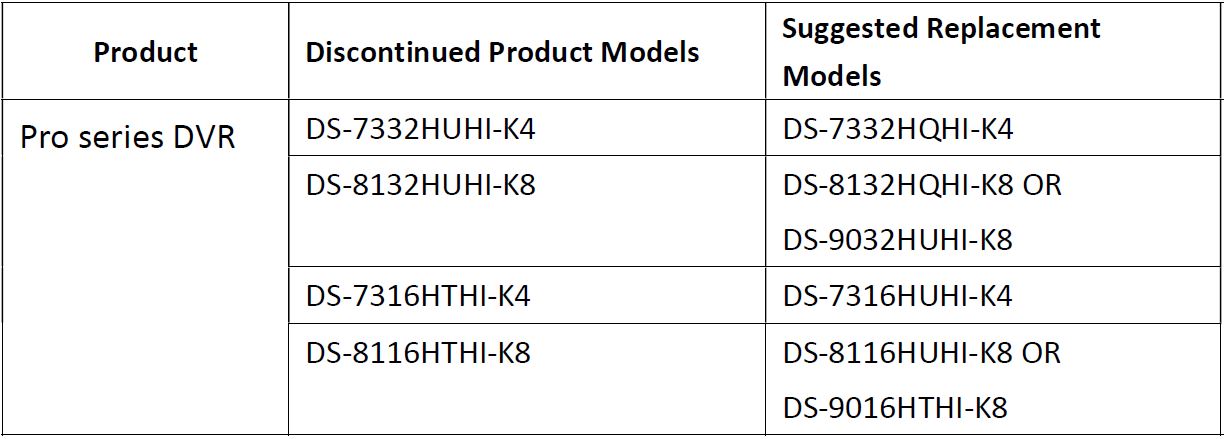
The purpose of this notification is to communicate that Hikvision is discontinuing the production of DVR as shown above. The supply of these products will stop after the date of last delivery as outlined herein. Final orders can only be accepted on or before the last order date and are subject to the availability. Early ordering is strongly recommended.
Product Models & Replacement
Support Information
The standard warranty remains in effect for all products affected by this discontinuation notice. Although the discontinued products will no longer be available for ordering after the “last order date”. Note: Hikvision will make effort to maintain stock of units in the case of warranty failures. If Hikvision does not have the direct replacement in that case, customers will be provided with a unit of comparable or better performance but Hikvision cannot guarantee the same form or fit for the replacement product.
For more information or to discuss alternative solutions, please contact our local sales representative or Tech Support team.
Getting clear views over a large area – such as a major traffic intersection, a warehouse, or a parking lot – isn’t always a simple task. It typically calls for multiple cameras and extensive cabling to be installed at a variety of locations, in order to cover the entire field of view.
But when it comes to installing hardware, the requirements can differ widely from one scenario to the next. For example, when applying security in public squares or large stadiums, it is ideal to compose a complete overview of the scene in ultra-high definition and with consistently high-quality imaging through changing weather conditions. For situational awareness in smaller spaces, such as stores or conference halls, a vertical viewing angle is preferred over 360-degree coverage. And the list goes on.
At Hikvision, we take these requirements and so much more into account. Our range of security solutions not only help customers increase their on-site security with complete coverage, but add value with components that simplify their day-to-day security and business operations. These include Hikvision’s PanoVu Series Panoramic Cameras, Ultra Series PTZ Cameras, and Fisheye Cameras, as well as the newly released line of TandemVu PTZ Cameras.
Flawless panoramas with extraordinary imaging
In large open sites like sport stadiums, plazas, and intersections, common security challenges are often about the large security scale, which requires several cameras to cover all corners of the view. This results in increased costs and difficulties in deployment. On the other hand, a large scene also indicates a need for HD images, so that security operators can enlarge the imaging to see details.
Cameras like those in Hikvision’s award-winning PanoVu series make a perfect choice here. The PanoVu panoramic cameras integrate multiple lenses into one unit, which means one PanoVu can cover an area that previously required multiple cameras, reducing product installation and management costs.
Thanks to the company’s advanced image stitching technology, PanoVus stitch images together to generate a single, seamless panoramic picture with 180° or 360° coverage, allowing security operators to enjoy a vivid and consistent viewing experience that’s more true-to-life. These advanced products offer impressive, high-definition imaging, with a maximum resolution of 32 MP, ensuring smooth video image preview and playback.
Pan, tilt, and zoom at any moment
In some cases, security coverage in critical areas becomes primary. When events happen, it is important to view the close-ups with high-definition detail. Commonly challenging scenarios include public squares with multiple entrances, waiting rooms at transit stations, and similar areas. Traditionally, complete security coverage requires a high number of IP cameras, but this may not be a cost-effective solution when events rarely take place. In this case, PTZ cameras become a great fit.
One advantage of PTZ cameras is their automatic patrolling capability. That means security operators can set rules for the cameras to monitor needed areas with defined duration, frequency and timing, to name a few. Additionally, Hikvision’s Ultra-Series PTZ Cameras feature ultra-high optical zoom – 42x, for example – to cover expansive areas. That allows security operators to zoom in on an object which is farther away, ensuring clarity in the details.
The Ultra Series cameras’ night vision capability is also stunning, as they incorporate Hikvision’s signature DarkFighter low-light technology which enables excellent HD images to be captured in light conditions down to 0.0005 Lux.
Big picture and small details in one view
There are also situations where a security view with wide-angle coverage needs to be maintained at all times, yet close-ups are needed for awareness if an incident occurs. An example can be a busy outdoor parking lot at a shopping mall. Due to the high volume of traffic entering for parking, facility managers need to be on high alert about where congestion takes place and make sure that customers park successfully without hassle.
Accidents can happen in the rush of finding a parking space. It would be very helpful for facility managers to understand what happened and where, and dispatch security staff immediately to site, help tackle the situation as needed, and clean up the intersection for other cars to pass through.
By using Hikvision’s new TandemVu PTZ cameras, facility managers can now maintain focus on both “viewpoints” simultaneously – monitoring large areas for overall situational awareness and zooming in on specific incidents for event management. Hikvision TandemVu PTZ cameras incorporate multiple lenses in one unit, providing big picture and small details in tandem. In this way, facility managers gain the “best of both worlds” with maximum security and reassurance.
When smaller areas need complete coverage
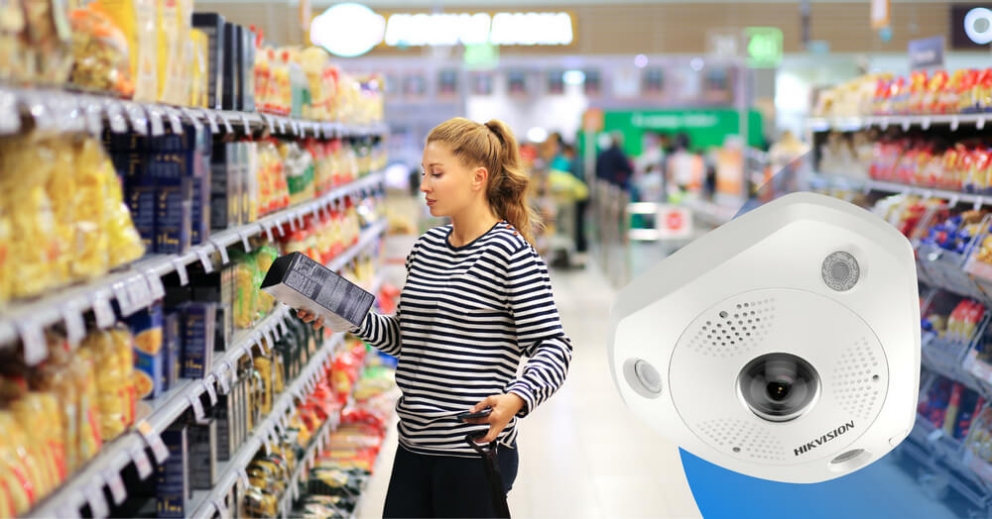
In places with less space to cover, such as retail stores and meeting rooms, complete coverage with situational awareness is often the first security priority. However, in this kind of scenario, objects blocking a camera’s line of sight throughout the floor are inevitable – such as shelves or other displays, for example. Therefore, a vertically-oriented view from the ceiling to the floor provides better coverage of a whole area. Fisheye cameras play their best roles here.
Hikvision Fisheye Cameras are among the most sophisticated on the market today. Featuring top-of-the-range Immervision lenses, they deliver a wider angle of view, less distortion, and sharper, more detailed images than many other cameras on the market, which results in more natural images once they have been dewarped.
Incorporated with deep-learning-based AI applications such as heat mapping, intersection flow analysis, and people counting, Hikvision fisheye cameras empower users with a wealth of data for business analysis, reporting, and smarter decision-making.
Efficient centralization
All these devices and technologies need to be managed, and this is where a powerful VMS like Hikvision’s HikCentral Professional comes in. Security operators can view real-time information via HikCentral Professional video management software, cruise around in panoramas, or zoom in and out. They can also use the gathered insights from video feeds to respond to events effectively and in real time.
Secure more with more assurance
Hikvision strives to help professionals from many walks of life stay confident and assured with future-shaping technologies, just as our advanced cameras address security challenges in protecting large sites and open areas. Apply for a smart trial today for a hands-on experience with Hikvision’s high-performance products – now guaranteed with a 5-year warranty! Also visit our website to learn more. You can further explore the Hikvision digital showroom for complete Hikvision product lines, core technologies, scenario-based solution packages and more.
Hikvision’s upgraded second generation Value IP Cameras and AcuSense NVRs come equipped with several enhanced key features for an incredible user experience. The 2nd Gen Value IP cameras enhance imaging for better performance while the AcuSense motion detection technology concentrates on human and vehicle events. This upgraded system is easy to use as the motion detection is on by default, so there is no need to configure the camera.
A common industry problem — false alarms — are not an issue with 2nd Gen Value IP cameras and AcuSense NVRs. In fact, the upgraded technology vastly reduces false alarms. The built-in algorithm supports multiple video content analytics (VCAs) to distinguish between humans, vehicles, and other objects. This AcuSense 2.0 algorithm reduces false alarms by up to 90%. Fewer false alarms save you time and effort and reduce costs.
Quick target searches are another feature of the upgraded functionality. Quick target searches enable users to:
Playback event video triggered only by human or vehicle targets
Spend significantly less time watching video
Quickly find targets when reviewing footage
G2 Value IP cameras support Quick Target Search and do not require an AcuSense NVR. Q- and I-Series NVRs also support this function. For more details on this and other features, watch the 2nd Gen Value IP cameras and AcuSense NVRs product training webinar on the Hikvision Learning Portal.
There are two ways to trigger alarm output of indoor station: 1. Zone alarm :when zone alarm is detected, it will trigger alarm output of indoor station 2. Calling linkage: when door station or other indoor station calls indoor station, it will trigger alarm output
1. Second generation indoor station( take DS-KH8520-WTE1 for example in this document) 2. iVMS-4200 V3.5.0.7 or later
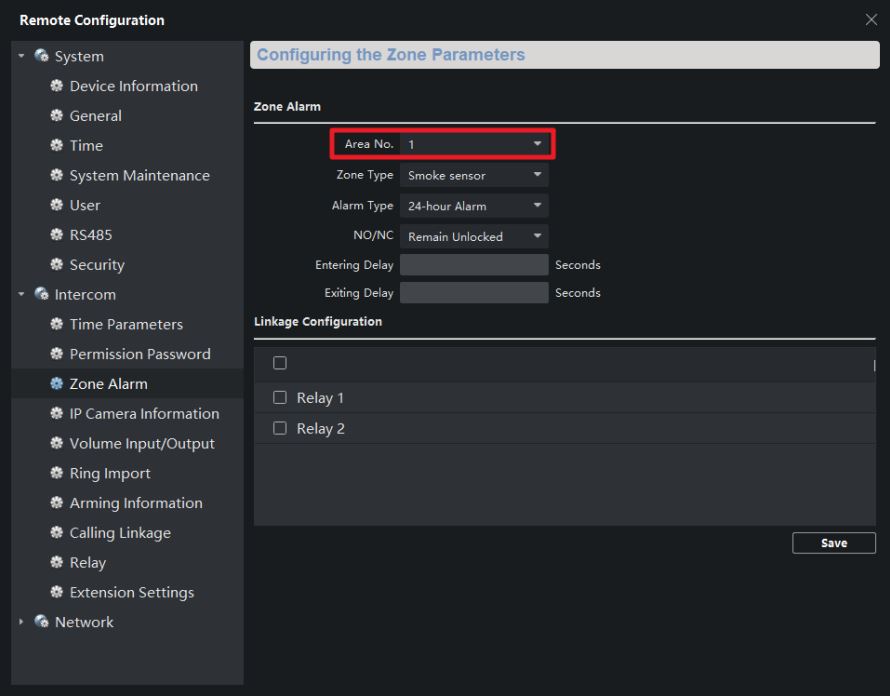
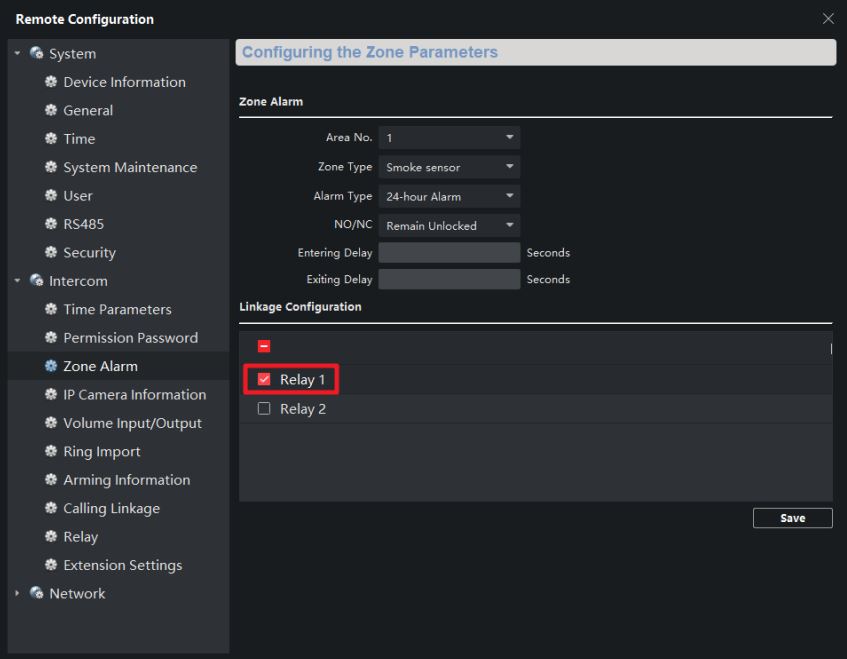
1. Zone alarm
1) Go to Remote Configuration-Intercom-Zone alarm, choose Area No. you pay attention to, set alarm type and other parameters
2) Choose the relay you want to trigger when zone alarm is detected and save
2. Calling linkage
1) Go to Remote configuration-Intercom-Calling Linkage, enable this function and choose the relay you want to be triggered when indoor station receive call
3. Configure relay settings
1) Go to Remote configuration-Intercom-Relay, choose the relay, edit name and active time of this alarm output. Output Delay is active time after alarm output is triggered