Author Archives: admin

Hikvision New NVR firmware leads the way in user-friendly interface

Hikvision, the world’s leading supplier of innovative video surveillance products and solutions, has launched a new generation of firmware for network video recorders, called NVR 4.0. The firmware will bring new visual design and new features, providing the ultimate user experience. It will be launched in the Hikvision Super I series and I series NVR devices, replacing the older NVR 3.0 GUI. Older devices will also be to benefit from the new firmware.

Based on a brand new design, a harmonized user experience and enhanced intelligent applications, the new generation GUI will allow operators to do a lot more, much more intuitively. They will notice a dramatic improvement in the operation of the recorder, with new features like:

• Target Detection, so significant targets can be detected and captured. Then captured snapshots link directly to event video playback.
• Smooth Dragging, so users can switch to the live view window by simple clicking and dragging.
• Thumbnail Playback, so prominent thumbnails can be linked to video playback and become visible when moving the mouse over the progress bar.
• Background Export, so users can still switch between menus while video is exporting.
• Graphic Camera Management, so the camera list can be displayed in thumbnail mode, and it’s easy to identify the surveillance scene from each camera.

NVR 4.0’s enhanced intelligent applications include Smart Data Release – giving users the ability to configure ratios between insignificant recordings and critical video so vital footage can be stored for longer. It is also enabled with HDD Health Management (developed in collaboration with Seagate), giving real-time monitoring on HDD health, enhancing safety and reliability.

Keen Yao, VP of Hikvision’s International Business Centre, says: “Hikvision is constantly looking at innovative ways to improve our products. But we don’t just look at the front-end cameras – we’re busy developing our whole solution set. After two years of development, we are proud to announce the pioneering NVR 4.0 GUI, which we think users will find a joy to use.”

Hikvision “Shoot ‘em up – with surveillance Complete security solutions for bank branches”

Everyone has a favourite heist film – whether it’s a traditional ‘shoot ‘em up’ like ‘Bonnie and Clyde’, or something a bit more hi-tech, like ‘Oceans 11’ they’re compelling viewing. However, more often than not, the audience sympathies are with the thieves. Of course, in reality, bank robberies cause a lot of damage, stress and injury, let alone the financial losses. Hikvision has all kinds of state-of-the-art technology to provide a full security solution for the banking industry – from the lobby to the vault deep within the bank’s walls.

It’s not just in security where banks are exploring AI and the use of technology to gain an edge. According to a report by Celent, a research, advisory, and consulting firm focused on financial services technology, IT spending in banking globally will increase by 4.2% annually, and amount to $272.6 billion in 2019 [1].   There are a number of priorities for banks. The most obvious ones are securing customers, employees and assets, but there are also considerations like collecting reliable video clips for investigation, intelligence to help them make business decisions and streamlining processes to manage all of their branches effectively. In the end, like all business, they are also looking to increase customer satisfaction. The development of AI and surveillance technology gives banks significant flexibility and new opportunities to build an interesting future, and this has scope across the entire bank.

Entering the Bank the front door and the lobby
Banks need to be aware of who is coming in and out – the starting point of monitoring. Clarity is important here, especially since the environment could lead to strong back lighting (on a bright day when the light behind the person coming in is a lot stronger than the ambient light inside). This is where WDR-enabled cameras come in, with the technology rendering a crystal-clear image, even in this environment. Super WDR can reach up to 140db, making faces clearly visible.

It’s also useful for banks to know footfall numbers of people coming in – to help with business decisions. A People Counting cameraat the entrance takes care of that, with smart technology able to distinguish individuals, so they’re only counted once, ensuring an accurate count.

With a busy bank having large numbers of people through the doors every day, it could be useful to be able to identify them. Facial recognition technology can, of course, be used for security – to trigger attention and action needed if ‘unwanted’ people are detected for example. But it can also be used to help with customer service. When clients opt to participate in VIP customer service programs, facial recognition technology can give banks accurate tools to identify VIPs so staff can provide the right kind of service at the right time.

At the counter
The main day-to-day activities of the bank happen at the counters. Counter transactions need to be recorded clearly to solve the disputes. HD cameras can give 4K resolution to provide good images where a bilateral close-up view is needed.

When recordings are clear, both counter staff and customers are protected, should any disputes need to be resolved.

Of course, cameras give close detailed images available for general security too.

Security deep in the vault
In the depths of the inner bank lies the vault – usually the first priority for security in any bank. Because vaults are often in low light areas, ultra-low light cameras like Hikvision DarkFighter are really useful to be able to monitor and record crystal-clear images even in the dead of night.

When the security around the vault needs to be strengthened, there are facial recognition options too, which can be supported by a Hikvision DeepinView camera. If the camera is connected to an access control system, it could literally be that only people whose face is stored on the ‘white list’ could enter.

Often, access corridors and areas close to the vault will be covered by cameras too – giving a full overview if a person’s movements need to be tracked through the building. Video analytics rules can also be set up to alert operators if a person ventures beyond a certain point – useful to prevent non-authorised persons from entering more sensitive areas.

It all comes together in the Security Centre
The place that few people see is the hub of all of the security activity. Feeds from all of the cameras can be managed and stored in the Security Centre using a video management software solution, like Hikvision HikCentral, simplifying security processes. Users can also access the security system via laptop or mobile which increases flexibility and efficiency of the security operations.

Technology is evolving with banking
With banks evolving and offering more and more services to their customers, the security challenges are also changing. The need to be constantly aware of who is in their building and monitor all activities – from the main lobby and banking counters to the vault itself. And bringing all of this information together becomes more important too – not just so that operations staff can access it when needed, but also because it provides valuable support for business decisions. That’s when surveillance starts to add a lot more value – helping them to serve their customers and improve the experience they have when using the bank.

Of course, the likelihood of most of the famous heists in film history actually being pulled off becomes very slim in the face of smart new technologies to monitor and secure our banks. Some of us will probably have to stick to routing for the villains in our favourite heists movies….

 Continue Shopping

Tiandy High Definition IP system at Heathrow Airport

London Heathrow Airport

Project: Heathrow Airport
Country:UK
Vertical Market: Transportation
Technology Features:
High Definition IP system
Distributed Remote Monitoring
IVA(Intelligent Video Analysis function)

Background:
Heathrow offers a digital CCTV solution with the initial focus on deployment at Heathrow, ensuring the security of your passengers, staff, passenger luggage and equipment. Heathrow offers a new CCTV infrastructure based upon digital technologies which allows a far greater flexibility in its use and enables cross-agency collaboration.

Heathrow video security system, in what is believed to be the modest system in UK to
deploy a surveillance solution with 100% IP cameras, which covers the public areas inside the
mall as well as the parking lots and surrounding areas, was designed and installed by TIANDY approved partners in UK.

All cameras are continuously recorded for a minimum of 30 days using TIANDY standalone Network Video Recorder (NVR) running on a custom software built server with 216TB of Raid 6 storage. TIANDY’s class-leading compression technology in combination with a unique feature helps reduce the overall storage requirement. Further more, the NVR provides IVS function, such as left&foreign detection to help passengers to get back the belongings.

Hikvision “FACIAL RECOGNITION APPLICATIONS”

The next level of security and business technology

Buy Now

Powerful new technologies like Machine Learning and Artificial Intelligence have recently been developed to offer an entirely new level of security. Video capture and recording solutions today can record facial images and compare them with incredible accuracy. And Hikvision is right there at the forefront of this exciting new horizon in protecting our communities, our loved ones, and our property.

There are many ways to use Facial Recognition to keep people safe, enhance business operations, as well as improve our everyday lives with optimised services. Here’s a glimpse into how it works and how we can use it to make the world safer each time it’s needed.

Law Enforcement

This technology serves best where suspect identification is most critical, including government and diplomacy buildings; borders and customs areas; travel nodes such as air and sea ports, just to name a few. Also, law enforcement personnel will find a more efficient way to investigate incidents with advanced footage retrieval using recognition capabilities and vehicle traits analysis algorithms.

Time & Attendance Reports

Now there is a better way to track attendance. Based on facial recognition technology, this new method is quicker, safer, and more accurate. Thanks to this technology, employees no longer need to remind themselves to carry ID cards all the time, and professors will no longer need to take roll one by one. A great tool at Educational Campuses, Factories, and at Events and Conferences.

VIP Recognition

Loyal VIP customers are enormously valuable to commercial entities, but service staff cannot always identify them immediately. Intelligent facial recognition cameras, however, can provide unique opportunities that were previously unavailable. When customers choose to participate in VIP programs, marketing promotions or other incentives, facial recognition technology will give retailers accurate tools to identify VIPs and loyal customers so staff can provide the right kind of service at the right time. Hikvision facial recognition can create new possibilities to optimize your next marketing program.

Blacklist Alarm

Using the Blacklist Alarm provides extra help to law enforcement personnel to identify known suspects in designated areas and secure public safety. For commercial customers, a list of interesting people can be used in a similar way to trigger attention and action needed if ‘unwanted’ people are detected at Sports Venues, Malls and Hotels, just to name a few.

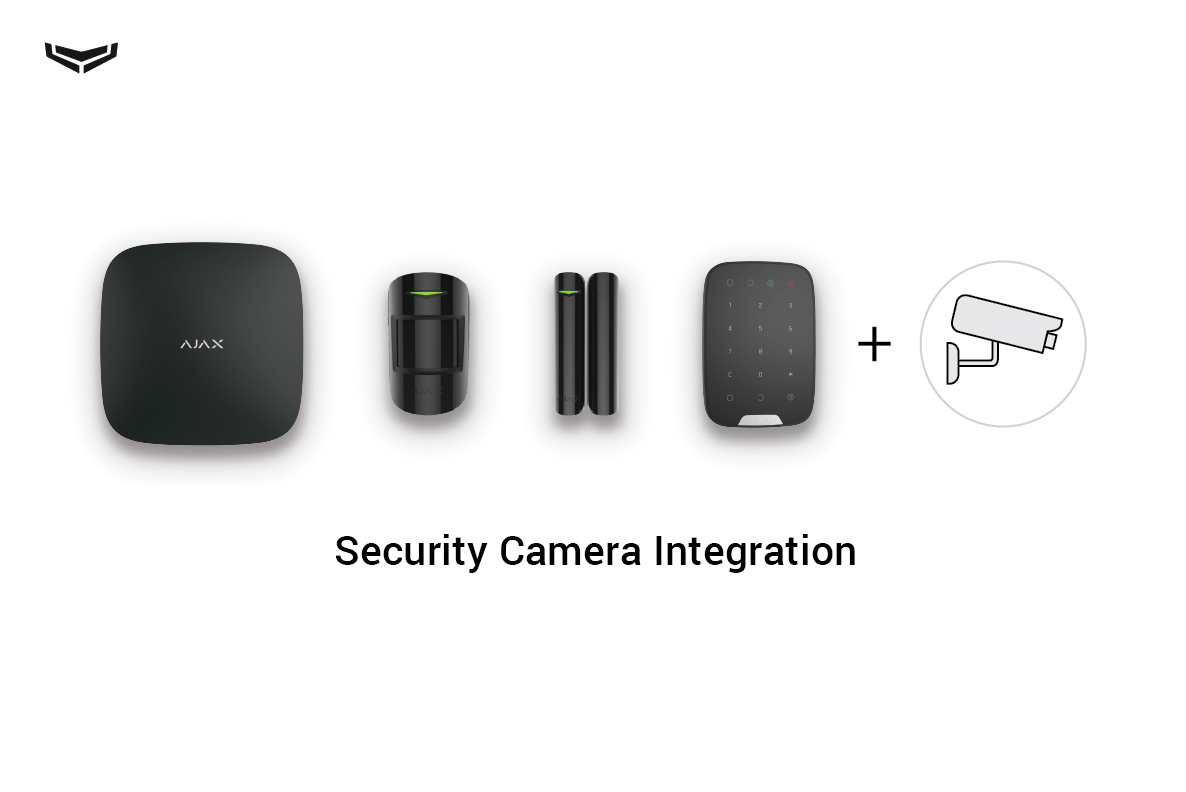
How to connect cameras to the Ajax security system

Video surveillance has long been a top feature request from Ajax security system users. And there’s a reason we ask users for feedback! Now the Ajax Security System app for iOS and Android can broadcast RTSP streams from security cameras. The video surveillance in addition to protection against break-ins, fire and flooding, as well as automation.

Connecting Hikvision cameras and DVR/NVR to Ajax

Why do you need a camera?


•  To know exactly who has entered your home (especially in case of a break-in).
•  To keep an eye on the cleaners while you’re away.
•  To watch your kids, even when you’re halfway across the globe.
•  To monitor whether your employees are at their desks at 9:00 sharp.


You can connect any IP camera that uses the RTSP protocol to the Ajax security system. There are no restrictions on brands or models, and the application supports up to 10 cameras or streams.Artboard-6We didn’t choose RTSP by accident — the protocol is supported by hundreds of cameras. It gives users the maximum possible freedom of choice when it comes to video surveillance equipment. Although this means that connecting a third-party camera is somewhat more complicated than connecting our Ajax devices (when you just need to scan a QR-code to connect Ajax products). We are currently working to integrate popular cameras into the security system. And then you’ll be able to store video on a server and view it online. But in the meantime, you’ll need a third-party DVR to record video streams.

How to connect an IP camera to the Ajax

If your ISP provides a static IP address:
Connect the camera to the router and configure it using the camera’s manual. Assign a free static IP address to the camera on the internal network. Check which port is being used for the camera’s RTSP stream (the default is 554) and set up port forwarding on the router. If several cameras are connected to the router, set up port forwarding for each camera.

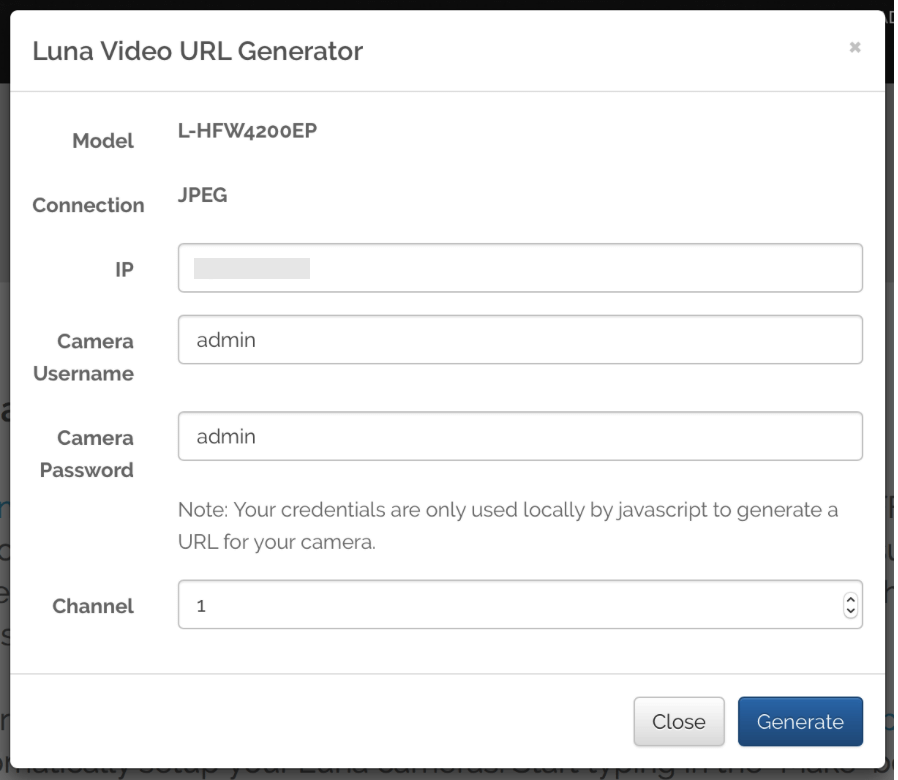
Generate an RTSP URL (for each camera), which will allow Ajax to receive the video stream. To do this, either refer to your camera’s manual or use the RTSP URL generator:

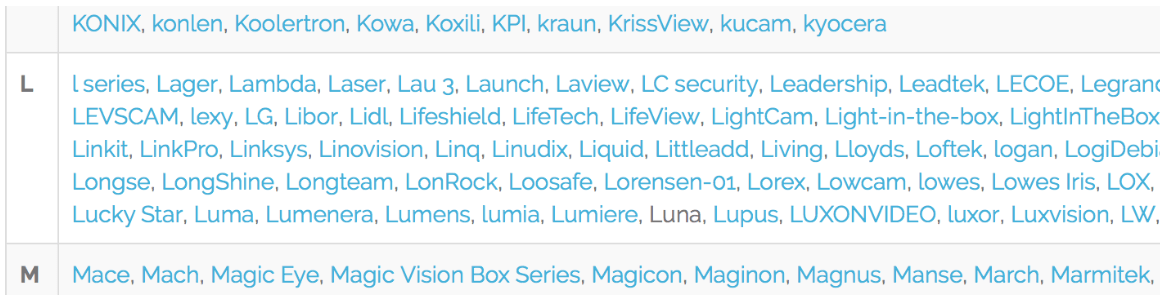
Select the camera manufacturer from the list:

camera integration ajax 2

Choose the model of your camera:

camera integration ajax 1

Specify the static IP address provided by the ISP (WAN IP router). If necessary, change the username and password, as well as the stream number:

camera-integration-ajax-4-1

Each stream is added to the Ajax Security System application as a separate camera. To select the optimal stream (for example, video with sound or in HD resolution), refer to the camera’s manual.

Click the “Generate” button and copy the RTSP URL of your camera:

camera-integration-ajax-3-1

Add the port number to the generated URL:

Example of the generated URL:
http://admin:admin@192.168.1.20/cgi-bin/snapshot.cgi?loginuse=admin&loginpas=admin

Generated URL with the port number:
http://admin:admin@192.168.1.20:554/cgi-bin/snapshot.cgi?loginuse=admin&loginpas=admin

You should add the number of the forwarded port of the camera to the URL!
If your ISP does not provide a static IP address, use the DynDNS service.
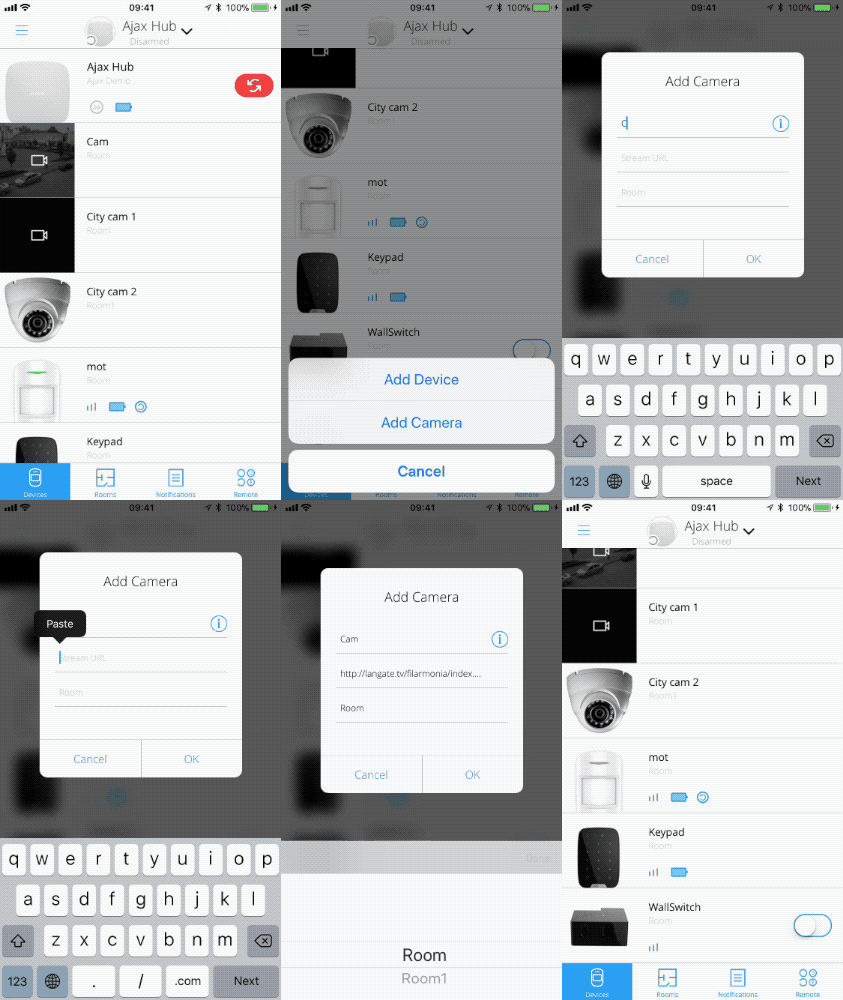
Using the Ajax Security System app, go to the menu to add new devices (cameras). This is where you’ll be able to specify the name, the RTSP URL and the room:

add-new-cam
cam-action
cameras-access-ajax


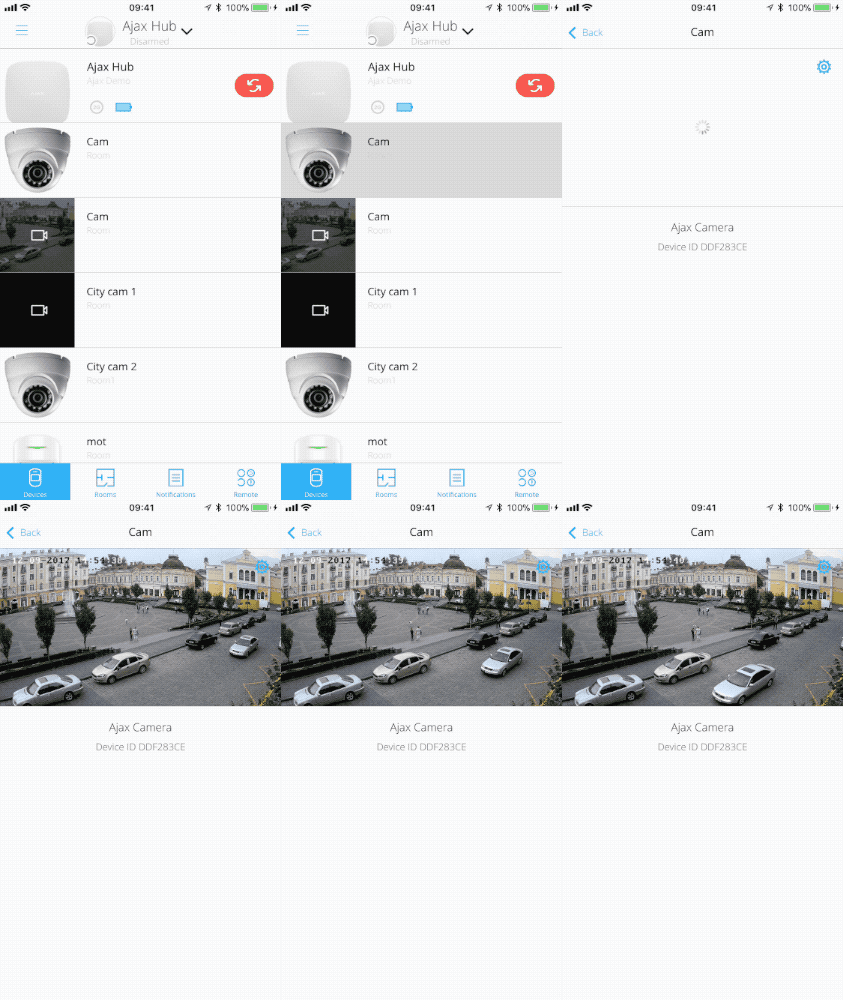
In order to view the video stream, just open the camera in the Ajax Security System application:

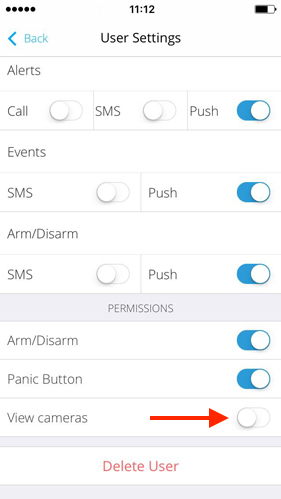
To provide access to the cameras to users of the security system, activate “View cameras” setting through the hub menu:

We know that it can be difficult to set up a camera and a router, then find a usable RTSP link. These tasks aren’t exactly trivial, especially for a user who isn’t confident in their technical abilities. So unexpected difficulties or nuances may come up. If you have trouble connecting a camera to Ajax while following these instructions, we strongly recommend contacting the manufacturer of the router or camera (depending on what you’re having issues with), asking for help from a tech savvy friend or finding a specialist.Continue Shopping

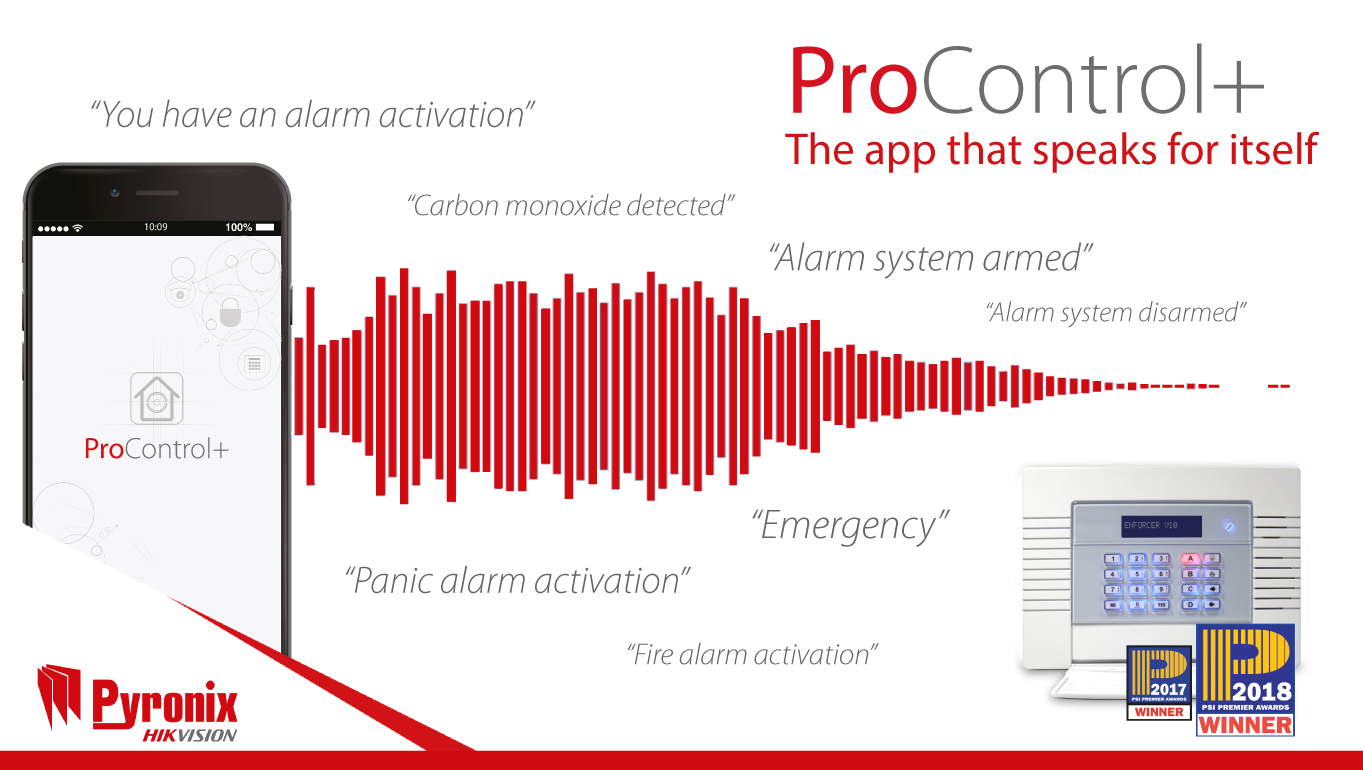
ProControl+, the app that speaks for itself

Pssst… have you heard?

We’ve added voice push notifications!

In our commitment to continuous improvement we are delighted to add voice push notifications to both iOS and Android versions of ProControl+.

You don’t have to do anything. This feature is available now; your users may have even already received them for events on their systems.

“We’ve listened to market demands and this is a feature that was very much sought, so we are very pleased to implement this,” Laurence Kenny, Pyronix Marketing Manager, said.

If there is an alarm, or when the system is set or unset, or an event is triggered by any Pyronix life safety devices integrated into the system, such as the SMOKE-WE, CO-WE or the HUD/MED-WE, the user will receive a voice push notification that will get their attention.

“This feature adds value to ProControl+, without any additional cost or action required,” Laurence said.

“Voice push notifications deliver a unique selling point, that differentiates your business from any other on the intruder market.”

“Whether it is a panic alarm, a smoke detector, a break in or as simple as children coming home from school, ProControl+ now audibly keeps the user informed, so that they can remain in complete control.”

This feature, combined with our range of Full-HD Wi-Fi cameras for video verification, allows users to be told what is happening, see what is happening and take appropriate action.

If your users do not receive push notifications currently and would like to now receive them with an audible voice, simply enable them in the PyronixCloud account.

Pyronix, giving intrusion a voice.

Hikvision “FACIAL RECOGNITION APPLICATIONS”

The next level of security and business technology

Buy Now

Powerful new technologies like Machine Learning and Artificial Intelligence have recently been developed to offer an entirely new level of security. Video capture and recording solutions today can record facial images and compare them with incredible accuracy. And Hikvision is right there at the forefront of this exciting new horizon in protecting our communities, our loved ones, and our property.

There are many ways to use Facial Recognition to keep people safe, enhance business operations, as well as improve our everyday lives with optimised services. Here’s a glimpse into how it works and how we can use it to make the world safer each time it’s needed.

Law Enforcement

This technology serves best where suspect identification is most critical, including government and diplomacy buildings; borders and customs areas; travel nodes such as air and sea ports, just to name a few. Also, law enforcement personnel will find a more efficient way to investigate incidents with advanced footage retrieval using recognition capabilities and vehicle traits analysis algorithms.

Time & Attendance Reports

Now there is a better way to track attendance. Based on facial recognition technology, this new method is quicker, safer, and more accurate. Thanks to this technology, employees no longer need to remind themselves to carry ID cards all the time, and professors will no longer need to take roll one by one. A great tool at Educational Campuses, Factories, and at Events and Conferences.

VIP Recognition

Loyal VIP customers are enormously valuable to commercial entities, but service staff cannot always identify them immediately. Intelligent facial recognition cameras, however, can provide unique opportunities that were previously unavailable. When customers choose to participate in VIP programs, marketing promotions or other incentives, facial recognition technology will give retailers accurate tools to identify VIPs and loyal customers so staff can provide the right kind of service at the right time. Hikvision facial recognition can create new possibilities to optimize your next marketing program.

Blacklist Alarm

Using the Blacklist Alarm provides extra help to law enforcement personnel to identify known suspects in designated areas and secure public safety. For commercial customers, a list of interesting people can be used in a similar way to trigger attention and action needed if ‘unwanted’ people are detected at Sports Venues, Malls and Hotels, just to name a few.

Hikvision launches AcuSense network cameras with strobe light and alarm to instantly deter intruders

Hikvision, the world’s leading supplier of innovative security products and solutions, has introduced new AcuSense network camera series to its EasyIP 4.0 security solutions. Featuring a strobe light and an audio alarm, the new cameras can immediately deter intruders from entering a prohibited site, further enhancing the safety of premises and property.

At the core: faster, more accurate intrusion detection 
Importantly, Hikvision AcuSense network cameras build on the same cutting-edge intrusion detection functionality found within the existing Hikvision EasyIP 4.0 security solutions.

When a potential threat is detected by the camera, it uses its intelligent false alarm reduction technology to disregard irrelevant movements, such as rain, leaves and animals. Instead, the camera focuses on human or vehicle movement, dramatically reducing the number of false alarms for faster, more accurate intrusion detection.

An enhanced deterrent: strobe lighting and alarm
Once a potential intruder has been accurately detected, the AcuSense network camera triggers the built-in strobe light and audio alarm. This is designed to warn the intruder off before they attempt to breach the perimeter. The volume of the audio alarm and the brightness of the strobe light can be adjusted to suit the environment.

Check the power of Hikvision AcuSense combined with strobe light and audio alarm

Reliable operation, day or night
The AcuSense network camera range can deliver this powerful intrusion detection and prevention at all times of day or night. Powered by Hikvision DarkFighter technology, all cameras in the range deliver superior surveillance images, even in ultra-low light.

Four products to suit different applications
The new AcuSense network cameras are available in bullet and turret styles, and in 2MP or 4MP resolution, making a total of four different camera options available.

Better service, greater peace of mind
Frank Zhang, General Manager of International Product Marketing Department at Hikvision says, “AcuSense technology is already cutting-edge. By adding the strobe light and the alarm, we can now give our customers the chance to prevent incidents from happening in the first place, for even better security. We’re delighted to be able to help our customers protect their property in ever more valuable ways.”

Product model details
There are four models available:
•    DS-2CD2346G1-I/SL: 4 MP IR Fixed Turret Network Camera
•    DS-2CD2326G1-I/SL: 2 MP IR Fixed Turret Network Camera
•    DS-2CD2T46G1-4I/SL: 4 MP IR Fixed Bullet Network Camera
•    DS-2CD2T26G1-4I/SL: 2 MP IR Fixed Bullet Network Camera

Continue Shopping

See More with Hikvision’s Expanded 6MP Ultra HD SMART IP Camera Series

Hikvision’s SMART IP camera ranges are being boosted with four newly added 6 megapixel Ultra HD camera series that provides a total resolution of 3072 x 2048 at full frame rate to deliver spectacular images. With this immense of view, one 6MP camera covers the area of several conventional cameras.

See more with Full Frame Rate in real-time

Unlike the majority of Full HD cameras that can only transmit a 2 megapixel image (1920 x 1080) at their full frame rate, all the Hikvision 6MP SMART IP cameras are capable of transmitting a full 3072 x 2048 6 megapixel image, even at full frame rate. This capability will be especially suited to applications requiring highly detailed surveillance, capturing the fine detail of license plates, clothing and faces to help law enforcement or monitoring cash handling areas, for instance.

The 6MP resolution combined with user-defined ROIs and SMART detection technologies also means a single camera from this new family could monitor an entire area that would previously have required a raft of low resolution units. At the same time, the ultra-low light capability and Smart IR built into the new range adjusts IR strength to maximize image quality in less than ideal lighting conditions. Finally, all four cameras are capable of streaming three simultaneous and independent HD video streams.

Smart Solution 2.0

The 6MP IP cameras deliver a complete Smart Solution when combined with Hikvision Smart NVR and comprehensive video management software. With front-end cameras providing Smart Detection, backend device for Smart Playback/backup and video management software for Smart management, Hikvision Smart range well combines intelligence, efficiency, and ease-of-use into modern video surveillance, and provides maximum security efficiency for operation and post-event investigation etc.

Expanding Customer Choice

“As the global CCTV market continues to move towards HD as the de facto standard, Hikvision is leading the way towards an HD+ future with the 6MP SMART IP family,” says Keen Yao, International Marketing Director at Hikvision. “Their enhanced imaging capabilities demonstrate the cutting-edge that our investment in R&D brings to customers worldwide.”

About the models:

The DS-2CD4A65F-IZ (H) SMART IP Outdoor Bullet camera’s key features include a motorized VF lens with SMART focus combined with an IR range of up to 50 metres.

The DS-2CD4665F-IZ (S) (H) SMART IP Vandal-proof Bullet camera is ideally equipped for outdoor use, particularly for night time surveillance courtesy of its 150 metre IR range.

The DS-2CD4165F-IZ SMART IP Indoor Dome camera is capable of 355° rotation and is equipped with SMART defog technology. It is also equipped with a vandal-proof housing and is available with two optional accessories for Indoor in-ceiling mount and wall mount.

The DS-2CD4565F-IZ (H) SMART IP Outdoor Dome camera is a cousin to the DS-2CD4165F-IZ, featuring all the industry leading specifications of the DS-2CD4165F-IZ while being adapted for use in outdoor environments.

Continue Shopping

What To Do About The Race To The Bottom, UK CCTV Installation Market

Over the past few years, we have seen the UK CCTV installation market being powered by a distinct driving force – price. In an effort to remain competitive and meet the market conditions, installers have been forced into the race to the bottom. 

While the proliferation of Chinese CCTV products continues to be a significant factor in the industry, suppliers are being offered a different path to solidify and grow their position through high quality, feature-rich products that enhance security installers’ ultimate profit margins and give their clients a video surveillance product they prefer to use. 

Security concerns abated  

Continued CCTV cybersecurity breaches and wide-open backdoor exploits leaked across the Internet have left their systems accessible to even the most unskilled hackers, and these have plagued the market over the last several years. Government officials have issued warnings and passwords have been changed. Nonetheless, security installers and end clients uncomfortably await hackers’ next set of tricks, perhaps praying for an “un-hackable” CCTV system. 

End-users are becoming far more security conscious due to the fact that GDPR laws require significant responsibilities for the integrity of CCTV data – thus, increasing the need for responsible security. Therefore, hacking not only presents a challenge, but also system abuse by authorised users which presently incurs hefty administrative expenditures to monitor. 

However, perhaps the answers come not in “un-hackability” or tedious manual administrative procedures? Perhaps one answer is a better ability to detect and be alert about potential intrusions? Hackers thrive on continuously creating new ways to implement their art and today’s “hacker proof” system becomes tomorrow’s conquest. However, if you can detect their activity and send an immediate alert, a hacker’s quest becomes increasingly futile.  The answer to ensuring proper system use by authorised users is equally simple.  A fine-grained user access permissions coupled with a way to easily track and monitor exactly what those users do should do the trick. 

ERTECH, a London-based video surveillance platform provider, was the first in the CCTV space to offer such robust intrusion detection and activity monitoring features. It was also a pioneer in fine-grained user activity tracking and makes it easy to monitor who saw what, what changes were made, who made them, and many features that make efforts to misuse the system futile.

Rethinking the NVR/DVR 

The “race to the bottom” NVR/DVR selection still suffers from the typical constraints:

– horrendous user interfaces

– time-consuming rewinding/fast-forwarding

– cumbersome setup procedures (port forwarding, etc.)

– a need to go on site when something happens

– a need to go on site to configure/re-configure

– a need to download footage onto a USB stick and take it to the relevant party in order to share it

– an inability to know when the NVR/DVR goes offline

– an inability to easily see all access to the system

– an inability to easily see every change to the system

– an inability to know about unauthorised system access 

The time and operational costs of dealing with the aforementioned easily nullify any original benefits in cost savings. 

Why not differentiate yourself with a solution that solves all of the above constraints?  Many of Ertech’s installers often present Ertech side by side with a traditional system. Overwhelmingly, end clients quickly see why Ertech wins. Ultimately, Ertech makes the installer more competitive and improves your relationship with your clients, making it easier to do your job. Ultimately, it makes you more profitable. 

Instant upgrades

With traditional systems, new security threats needing software patches wait for painstaking manual updates while continuing to be vulnerable (best case scenario) or for the new version of the product (months if not years away). A seemingly easy interface update is subject to the same time frames, if not longer. 

The solution sits in systems that release instant updates over the air, without any extra work being required for the installer or end user. Ertech’s ethos is to continuously improve and upgrade our product. Therefore, we release updates regularly. Our clients simply log in and enjoy updates and new features. Ertech also takes regular surveys from our clients, asking about their needs and where the system can be improved. Feedback is incorporated in future development plans. Ertech’s cloud video surveillance platform facilitates this perfectly. 

How to win

Education is key. End clients are very willing to listen to explanations of how spending a couple of extra hundred pounds on installing a CCTV system can mitigate their security concerns, offer improved UI and save time.

As a British supplier, ertech not only offer a visibly superior product, but many of the inherent security issues that plague Chinese products simply do not exist with ertech. We provide cutting-edge intuitive software which suits the evolving security needs of the 21st century. Our revolutionary cloud video surveillance and security system puts both installers and end users firmly in control and safe in the knowledge that they are protected by one of the most reliable and robust systems on the market.